I CAN have nice things, right?!?! Pulling the trigger on a Bambu Lab H2S

Nifty

Printer VIP
Administrator
Joined
Nov 3, 2004
Messages
3,135
Reaction score
1,512
Points
337
Location
Bay Area CA
Printer Model
CR-10, i560 ,MFC-7440N
It's in stock and I can get it in two days!

I don't usually buy extended warranties, but 4 years for $150... even if it's a false sense of security, karma is worth it to me.

I'm so nervous to pull the trigger, especially because the P2S with the combo is about half as much.

1765703964340.png
 

Tony4597

Printer Guru
Joined
Jan 20, 2021
Messages
123
Reaction score
76
Points
105
Location
Cheshire, UK
Printer Model
Epson Surecolor SC P800
Go for it you know you want it you will regret it if you try to save money on the lesser model :celebrate

:eek: Ohh, so sorry got carried away there for a moment. As much as I like to encourage others to spend their hard earned cash I think that a moment or two studying the pros and cons of each choice can often help crystalize ones thoughts and clarify ones needs.

Of course that can only work if you are sure of your current needs, and able to predict your future needs and ambitions assuming that budget is not a priority :he

So after being zero help to you so far and assuming you have not seen it, a comparison from the web which may help.

The Bambu Lab P2S vs. H2S debate on forums highlights the H2S as the premium, more capable machine with a larger build volume, heated chamber (crucial for ABS/ASA), better noise dampening, and future upgrade potential (like the Vortec tool changer), while the P2S offers near-identical print quality for most users in a smaller form factor, acting as a robust, cost-effective upgrade to the P1S, perfect for standard PLA/PETG needs without the high-temp features

Bambu Lab P2S
  • Best For: Standard PLA/PETG, cost-conscious users, those needing a reliable enclosed printer.
  • Pros: Great print quality (same core tech as H2S), updated features (new UI, extruder), good value.
  • Cons: No heated chamber (needs DIY for high-temp), smaller build volume than H2S, potentially noisier than H2S.
Bambu Lab H2S
  • Best For: Enthusiasts, large prints, high-temp materials (ABS/ASA), users wanting advanced features.
  • Pros: Larger build volume, active heated chamber, better filtration, quieter, compatible with future H-series upgrades (Vortec).
  • Cons: More expensive, potentially overkill if you only print PLA.
Key Differences (Forum Consensus)
  • Heated Chamber: H2S has one; P2S doesn't (needs mods for ABS).
  • Build Volume: H2S is larger (for big props/armor).
  • Noise: H2S is generally quieter.
  • Upgradability: H-series (H2S) is built for future addons like the Vortec tool changer; P-series is not.
  • Belt/Motion: H-series uses finer belts for potentially fewer VFAs (Vertical Fine Artifacts).
Verdict: If you need big prints or ABS/ASA and have the budget, H2S wins. If you mainly do PLA/PETG and want great Bambu quality without the premium price, the P2S is an excellent choice

Warranty thoughts
I think the standard Bambu warranty in the USA is 12 months? So you are buying 3years extra for $50 per year. To me this seems not unreasonable but it may be worth checking the terms and coverage as IIRC Bambu limits certain parts of the package to 3 months. It may be that the extruder and AMS have a shorter warranty - 3 months?

Good luck in the decision making process :thumbsup
 
Last edited:

Tony4597

Printer Guru
Joined
Jan 20, 2021
Messages
123
Reaction score
76
Points
105
Location
Cheshire, UK
Printer Model
Epson Surecolor SC P800
An interesting if somewhat expensive upgrade for H2S. Not sure of pros and cons vs other marques
 

Nifty

Printer VIP
Administrator
Joined
Nov 3, 2004
Messages
3,135
Reaction score
1,512
Points
337
Location
Bay Area CA
Printer Model
CR-10, i560 ,MFC-7440N
So after being zero help to you so far and assuming you have not seen it, a comparison from the web which may help.
LOL. I SUPER appreciate your thoughts and help... I definitely need it!

I think the standard Bambu warranty in the USA is 12 months? So you are buying 3years extra for $50 per year. To me this seems not unreasonable but it may be worth checking the terms and coverage as IIRC Bambu limits certain parts of the package to 3 months. It may be that the extruder and AMS have a shorter warranty - 3 months?
That's a great perspective, and basically how I was looking at it. My local BestBuy is right down the street, so it's good to know if I have a big problem (with the main board, main parts, etc. that are much harder to service than my cheap Enders), I can just bring it in, and make it their problem vs. working with Bambu, shipping, etc. etc. etc.

Verdict: If you need big prints or ABS/ASA and have the budget, H2S wins. If you mainly do PLA/PETG and want great Bambu quality without the premium price, the P2S is an excellent choice
Ugh, over the years I haven't "needed" much more than PLA, PETG, and TPU, but maybe if I had a printer that did everything... I'd print other stuff more often? Also, the size... I don't think I "need" all the extra size, but I like the idea.

... but the size comes with the cons of where to put it, but I do wonder if I'll like / get-used-to the idea of having the printer in another room?

Go for it you know you want it you will regret it if you try to save money on the lesser model :celebrate
Well, I hope you're right... because I pulled the trigger and got the H2S (will be here in 2 days).

The P2S was definitely tempting (almost 1/2 the price and resolves some of the space issues), but it's time I finally had a top-of-the-line printer... especially considering how passionate I've been about this hobby for getting close to 10 years!!!
 

Tony4597

Printer Guru
Joined
Jan 20, 2021
Messages
123
Reaction score
76
Points
105
Location
Cheshire, UK
Printer Model
Epson Surecolor SC P800
....Well, I hope you're right... because I pulled the trigger and got the H2S (will be here in 2 days).

The P2S was definitely tempting (almost 1/2 the price and resolves some of the space issues), but it's time I finally had a top-of-the-line printer... especially considering how passionate I've been about this hobby for getting close to 10 years!!!
Congratulations, I am pretty sure you are going to be delighted with your choice :celebrate

I hope that you do enjoy the fact of not having to babysit in the same room as the printer and you can always keep track of it on the built in 'baby monitor' :D
 

Nifty

Printer VIP
Administrator
Joined
Nov 3, 2004
Messages
3,135
Reaction score
1,512
Points
337
Location
Bay Area CA
Printer Model
CR-10, i560 ,MFC-7440N
The H2S arrives this evening!

I'm kinda nervous and excited.
 

Nifty

Printer VIP
Administrator
Joined
Nov 3, 2004
Messages
3,135
Reaction score
1,512
Points
337
Location
Bay Area CA
Printer Model
CR-10, i560 ,MFC-7440N
It arrived a day early!!!

It's super HUGE and it's fantastic!

Dislikes:
  1. It really is super big. It takes up a lot of space.
  2. The startup process on every print, even tiny ones, takes a lot longer than I think it should. That's even if I have already calibrated everything and have calibrations turned off.
  3. It's super loud during calibrations and the startup / nozzle bumping and other routines. I'll have to check into what / why it's banging all over like CRAZY, but it's pretty annoying. Even in the other room, these processes are LOUD! The AMS winding in / out is really fast and also VERY loud
  4. It's going to take me a little while to get used to Bambu Studio.
  5. It shakes a LOT... and for such a big printer, it's very noticeable. In fact, my GF kept wanting to support it / brace it.
  6. I can tell printing TPU is going to be a PITA
Likes:
  1. Wow... it just works. The first model (my very first Benchy in 10 years) was right from the printer, and the next 4 prints were from my phone. The next 3 prints were downloaded into Bambu Studio.
  2. It's FAST! I've been printing pretty much every model in ludicrous mode, and they still turn out incredibly clean.
  3. I want to reiterate that the printing quality is phenomenal. I ordered a few 0.6 nozzles so I can bump up the layer height a bit. I rarely need the level of detail that I get from a 0.4
  4. I'm not sure if it's a combination of the build plate, the heated chamber, the nozzle, hot end, or other stuff, but I haven't had to do anything to prep the surface of the build plate. I remember having to use tape for years and then glue stick for years. Pretty crazy to think that I might not ever have to do those things again. (Except maybe glue stick when I want to print stuff that I'm worried will permanently adhere to the print bin. )
  5. The touchscreen is incredibly responsive. The touch screen is incredibly responsive and easy to navigate.
  6. I love that I can access the live video from my phone and from my computer anytime, anywhere.
  7. They did a fantastic job packing it incredibly well. I'd be surprised if they have very many issues with these getting damaged in shipping.
  8. I wasn't sure if I was going to get the AMS, but I'm really glad I did. It's amazing how easy it is to load and switch filaments.
  9. I know it's early, but so far printing quality, speed, and reliability look like they're going to be light years ahead of anything else I've experienced.

Again, I've never printed a Benchy before, but since it was on the printer and I thought if I was ever going to test quality, this was going to be the time.

11 minutes in ludicrous mode. Quality is pretty perfect!

benchy.jpg
 
Last edited:

Redbrickman

Printer Master
Joined
Dec 27, 2010
Messages
1,217
Reaction score
1,354
Points
293
Location
UK
Printer Model
Brother MFC-L8690-CDW
@Nifty Congrats and have fun. As far as the noise is concerned you will find it a lot quieter with the slower print speed modes. It's all very well printing at insane speeds but better quality and less noise are a product of slower speed printing.

I'm sure you will tame it soon :)

I know very little about Bambu's but as far as printing TPU is concerned I believe it is best to avoid using the AMS for TPU.

I'd also look into adding an internal filter to cut down the VOC's

This will get you started and will test your machine priniting the parts in ABS

https://www.printables.com/model/757663-nevermore-mini-3d-printer-hepa-and-carbon-air-filt


And a mod for the X1C so maybe check space available in your Bambu model as it may fit without this mod

https://makerworld.com/en/models/65...mod-for-bambulab?from=search#profileId-578534

Oh and forget all the stuff you will read about cleaning build plates with IPA etc. Simply wash occasionally in dish soap and dry with a lint free cloth and avoid touching the surface.
 
Last edited:

Tony4597

Printer Guru
Joined
Jan 20, 2021
Messages
123
Reaction score
76
Points
105
Location
Cheshire, UK
Printer Model
Epson Surecolor SC P800
It arrived a day early!!!

It's super HUGE and it's fantastic!

Dislikes:
  1. It really is super big. It takes up a lot of space.
Yes, but if you are going to have one have a big un as they say. You know it makes sense ;) :D
  1. The startup process on every print, even tiny ones, takes a lot longer than I think it should. That's even if I have already calibrated everything and have calibrations turned off.
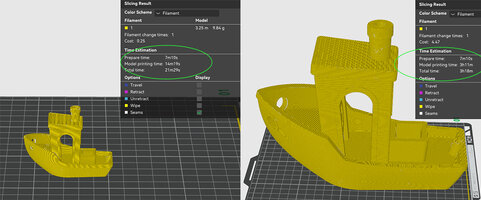
My first thoughts too, taking a long time to start printing. You may notice in Bambu Studio that the preparation time for a model remains the same regardless of the size of the model. In the case of the example image prep is 7min 10s for the small benchy and exactly the same for the 4x enlarged Benchy.

You can reduce the time prep time in the next screen if you want by selecting no bed levelling (not a good idea IMHO at least for a first print in a series)

Not sure what youo mean by already calibrated and turned calibrations off, could you explain please?


  1. It's super loud during calibrations and the startup / nozzle bumping and other routines. I'll have to check into what / why it's banging all over like CRAZY, but it's pretty annoying. Even in the other room, these processes are LOUD! The AMS winding in / out is really fast and also VERY loud
Noise issues. Well it is at least in theory said to be quieter than the P1S I own by at least 10 decibels
same result from CNC kitchen
When you first install the machine and run set up the calibration / input shaping do make a hell of a noise but after should settle down. Of course your chosen printing speed
If noise a concern, maybe printing at night consider switching to slower speed ?

  • Silent: ~50%
  • Normal: 100% (Baseline)
  • Sport: ~124% (Increased speed & acceleration)
  • Ludicrous: ~166% (Max speed for fastest results)
  1. It's going to take me a little while to get used to Bambu Studio.
Yep, there are so many settings that can effect print outcomes I am still struggling. Plenty of good advice on the web though (along with the bad!!). Up till now Orca and Bambu have been very close. If this will change due to what appears to be a split remains to be seen. Of course if you want Orca you will need to go to LAN mode only
  1. It shakes a LOT... and for such a big printer, it's very noticeable. In fact, my GF kept wanting to support it / brace it.
I did notice that on my first play with P1s and it came as a bit of a shock. However this does not affect print quality in any way that I can see and my assumption that this has been taken into account in the set up process, input shaping?
  1. I can tell printing TPU is going to be a PITA
As I have never tried TPU I can only go by what others have said:
There is a dedicated TPU inlet on the printer.
Use this for TPU 95A, you can also use the main rear inlet, but you have an AMS connected that that.

Any softer TPU like: 85A or 90A should be feed directly into the print head.

https://wiki.bambulab.com/en/h2/h2d-tpu-printing-guide

Likes:
  1. Wow... it just works. The first model (my very first Benchy in 10 years) was right from the printer, and the next 4 prints were from my phone. The next 3 prints were downloaded into Bambu Studio.
:D
  1. It's FAST! I've been printing pretty much every model in ludicrous mode, and they still turn out incredibly clean.
I rarely felt the need for Ludicrous mode (that will be noisier and shake machine more!) but nice feature for proofing a model.
  1. I want to reiterate that the printing quality is phenomenal. I ordered a few 0.6 nozzles so I can bump up the layer height a bit. I rarely need the level of detail that I get from a 0.4
Did the same 0.8 although so far not tried them. The nozzle change is more involved on the P1S
  1. I'm not sure if it's a combination of the build plate, the heated chamber, the nozzle, hot end, or other stuff, but I haven't had to do anything to prep the surface of the build plate. I remember having to use tape for years and then glue stick for years. Pretty crazy to think that I might not ever have to do those things again. (Except maybe glue stick when I want to print stuff that I'm worried will permanently adhere to the print bin. )
You will find divided opinion on plate cleaning. Basic recommendation is just soap and water and dry. Some advocate never ever ever use IPA. I have been using IPA for years without issue and prefer it for speed over washing a plate (which I think is Bambu rec.).
  1. The touchscreen is incredibly responsive. The touch screen is incredibly responsive and easy to navigate.
  2. I love that I can access the live video from my phone and from my computer anytime, anywhere.
  3. They did a fantastic job packing it incredibly well. I'd be surprised if they have very many issues with these getting damaged in shipping.
  4. I wasn't sure if I was going to get the AMS, but I'm really glad I did. It's amazing how easy it is to load and switch filaments.
  5. I know it's early, but so far printing quality, speed, and reliability look like they're going to be light years ahead of anything else I've experienced.
Your WOW experience is exactly what I had with the P1S and still get when a print comes of the plate. I am sure over time you will come to find the odd feature that you wish was different but I am pretty sure your experience will echo mine with Bambu

Again, I've never printed a Benchy before, but since it was on the printer and I thought if I was ever going to test quality, this was going to be the time.

11 minutes in ludicrous mode. Quality is pretty perfect!

View attachment 18022
 

Attachments

  • Benchy size.jpg
    Benchy size.jpg
    268.6 KB · Views: 3
Last edited:
Top