ccStudio Worked Great… Until It Didn’t. Looking for Insight

tricey

Print Lurker
Joined
Jan 13, 2026
Messages
6
Reaction score
1
Points
1
Printer Model
Epson 3880, Canon PIXMA iX6820
I’m hoping someone here might have some insight because this has been driving me a little nuts.

I’m on a Windows 10 PC using a ColorMunki Photo with ccStudio. I originally used the old ColorMunki Photo software and had great results. When ccStudio came out, I upgraded and everything worked perfectly, so I switched fully to ccStudio for making my custom ICC profiles.

About a year (or less) into using ccStudio, something changed out of nowhere. New profiles made with ccStudio started looking bad, and even older profiles I had already made with ccStudio stopped producing the same quality they used to. My blacks especially started looking muddy and weak.

I print with a Canon Pixma iX6820 and an Epson 3880. Because of this issue, I ended up remaking a lot of profiles using the original ColorMunki Photo software, and as of today, that’s the only software that gives me usable ICC profiles.

What’s confusing is that I didn’t change my workflow. I double-check all print settings and have them saved per paper type so I don’t accidentally mess something up. I print from Photoshop and make sure the correct settings are selected. When saving profiles, I always create both V2 and V4 versions and label them clearly. When I make profiles with the ColorMunki Photo software, I also add “CM” to the profile name so I know exactly where it came from.

I recently noticed that Calibrite has Profiler 3.0 now. I don’t mind paying to upgrade, but I’m honestly worried I’ll run into the same issue I had with ccStudio. I really miss ccStudio because I liked being able to save my workflow and come back to it after letting prints dry overnight.

For now, I’m sticking with the original ColorMunki Photo software and plan to try PrintPrism once my supported scanner arrives. Is Profiler 3.0 worth the upgrade, or am I likely to run into the same issues?

Has anyone experienced a sudden change like this before? Any idea what could cause profiles to just stop working properly? Also—should I finally give in and upgrade to Windows 11? I’ve been declining it, but I do keep Windows 10 fully up to date.

I’ve uploaded recent V2 and V4 ICC profiles I made for my Canon Pixma iX6820 on an uncoated Xerox Bold paper that I need for a current project, in case anyone wants to take a look.

Thanks in advance—I really appreciate any thoughts or ideas.
 

Attachments

  • ccStudio-ICC.zip
    2.9 MB · Views: 9

Tony4597

Printer Guru
Joined
Jan 20, 2021
Messages
136
Reaction score
82
Points
105
Location
Cheshire, UK
Printer Model
Epson Surecolor SC P800
....
About a year (or less) into using ccStudio, something changed out of nowhere. New profiles made with ccStudio started looking bad, and even older profiles I had already made with ccStudio stopped producing the same quality they used to. My blacks especially started looking muddy and weak.
This suggests that it is not the software particularly as old profiles not of same quality. Suspect a printer/ink/driver issue somewhere or settings within Photoshop
Get hold of a test image and print on normal photographic paper using manufacturers profiles- do the images still exhibit muddy and weak results?
....

What’s confusing is that I didn’t change my workflow. I double-check all print settings and have them saved per paper type so I don’t accidentally mess something up. I print from Photoshop and make sure the correct settings are selected. When saving profiles, I always create both V2 and V4 versions and label them clearly. When I make profiles with the ColorMunki Photo software, I also add “CM” to the profile name so I know exactly where it came from.
I would suggest you forget about (at least for now) v4 profiles. Most colour gurus suggests they bring nothing to the table but can be problematic in some cases. AFAIR Adobe abandoned ICC v4 and converts to v2 anyway, at least that was the rumour mill some years ago.
I recently noticed that Calibrite has Profiler 3.0 now. I don’t mind paying to upgrade, but I’m honestly worried I’ll run into the same issue I had with ccStudio. I really miss ccStudio because I liked being able to save my workflow and come back to it after letting prints dry overnight.

For now, I’m sticking with the original ColorMunki Photo software and plan to try PrintPrism once my supported scanner arrives. Is Profiler 3.0 worth the upgrade, or am I likely to run into the same issues?
My suspicion is you will run into the same issues as at first glance it does not appear to be solely profile related. Sometimes uninstalling old software completely rebooting and reinstalling solves odd behaviour and should be attempted first
Has anyone experienced a sudden change like this before? Any idea what could cause profiles to just stop working properly? Also—should I finally give in and upgrade to Windows 11? I’ve been declining it, but I do keep Windows 10 fully up to date.
Version of Windows will make zero difference. Windows 10 support ended October last year, however that does not mean that it will no longer work.
I’ve uploaded recent V2 and V4 ICC profiles I made for my Canon Pixma iX6820 on an uncoated Xerox Bold paper that I need for a current project, in case anyone wants to take a look.

Thanks in advance—I really appreciate any thoughts or ideas.
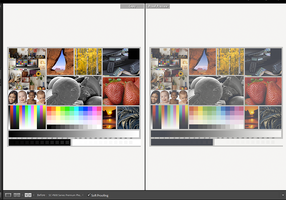
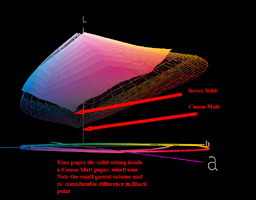
Both profiles appear OK although of course the Xerox paper you use is very limited and likely to produce poor black levels. Note the look of the soft proof version in Lightroom and the limited gamut of the Xerox paper and poor black level in Colorthink

The test image shown in LR is a good example to try and print, better not to use your own images at this stage for evaluation
 

Attachments

  • LR_SoftProof.png
    LR_SoftProof.png
    532.1 KB · Views: 20
  • Xerox gamut.png
    Xerox gamut.png
    177.5 KB · Views: 18
Last edited:

tricey

Print Lurker
Joined
Jan 13, 2026
Messages
6
Reaction score
1
Points
1
Printer Model
Epson 3880, Canon PIXMA iX6820
This suggests that it is not the software particularly as old profiles not of same quality. Suspect a printer/ink/driver issue somewhere or settings within Photoshop
Get hold of a test image and print on normal photographic paper using manufacturers profiles- do the images still exhibit muddy and weak results?
My manufacturer profiles are fine, and the ICC profiles created with the ColorMunki Photo software also print correctly. The only issue is with profiles made in ccStudio, which consistently look muddy on all matte papers. I’ll try reinstalling the software—I just need to make sure I save a copy to a flash drive first, since the company has removed it and it’s no longer available online.
Both profiles appear OK although of course the Xerox paper you use is very limited and likely to produce poor black levels. Note the look of the soft proof version in Lightroom and the limited gamut of the Xerox paper and poor black level in Colorthink

The test image shown in LR is a good example to try and print, better not to use your own images at this stage for evaluation
I’m working on a craft project that requires 32 lb uncoated text paper, and this is my first time printing on uncoated stock. I quickly learned that my Canon isn’t the best with uncoated papers. However, my Epson 3880 handles uncoated paper very well and produces solid black levels when using a custom ICC profile created with the ColorMunki Photo software. After creating any profile, I always print a PDI image target for evaluation—that’s how I know the ccStudio profiles are off. I’m just trying to understand why ccStudio suddenly stopped producing usable profiles on my end. I see that it still works for other people, so I’m not sure why I’m having issues. I save all of my paper settings and use the correct options—if I weren’t, the ColorMunki Photo ICC profiles would be off as well.
 

pharmacist

Printer VIP
Platinum Printer Member
Joined
May 29, 2007
Messages
3,017
Reaction score
1,748
Points
333
Location
Ghent, Belgium
Printer Model
SC-900 ET-8550 WF-7840 TS705
I don't understand the problem. I am using ccStudio with my i1Studio and previous with the Colormunki Photo and never a problem at all. I find it even stranger you paid for the Calibrite software (razorblade business model, which I hate).
 

tricey

Print Lurker
Joined
Jan 13, 2026
Messages
6
Reaction score
1
Points
1
Printer Model
Epson 3880, Canon PIXMA iX6820
This is the ICC profile created with the ColorMunki Photo software for the same Xerox Bold paper on my Epson 3880. I also attempted to create a profile for the same paper on my Canon using the ColorMunki Photo software, but I encountered scanning issues during the second set of color targets. The brown and black patches were adjacent and very close in tone, which likely caused the scanning errors and prevented the process from moving forward. I suspect the ColorMunki spectrophotometer had difficulty distinguishing those colors, most likely due to the paper-and-ink combination.
 

Attachments

  • Epson Stylus Pro 3880_UPPPM_CM-x-bold.icm.zip
    1.4 MB · Views: 8

tricey

Print Lurker
Joined
Jan 13, 2026
Messages
6
Reaction score
1
Points
1
Printer Model
Epson 3880, Canon PIXMA iX6820
I don't understand the problem. I am using ccStudio with my i1Studio and previous with the Colormunki Photo and never a problem at all. I find it even stranger you paid for the Calibrite software (razorblade business model, which I hate).
My main issue is that ccStudio is no longer producing usable profiles the way it used to. I haven’t paid for any software yet, so I’m hesitant to upgrade to Profiler 3 while I’m still experiencing these issues with ccStudio. I understand that many people aren’t having problems with ccStudio—this seems to be specific to my setup. I’m just trying to understand what changed and how to fix something that suddenly stopped producing usable profiles.
 

crenedecotret

Print Addict
Joined
Oct 5, 2006
Messages
202
Reaction score
75
Points
163
I'm not sure why the old colormunki version would work while the newer one fails. My gut feeling is that something is off with your print settings in ccstudio while OK in the Colormunki app. You could maybe try the "save" workflow in ccstudio and print the charts in tiff format using the Adobe color print utility. The utility ensures that your printer is not doing any color management.
 

tricey

Print Lurker
Joined
Jan 13, 2026
Messages
6
Reaction score
1
Points
1
Printer Model
Epson 3880, Canon PIXMA iX6820
I'm not sure why the old colormunki version would work while the newer one fails. My gut feeling is that something is off with your print settings in ccstudio while OK in the Colormunki app. You could maybe try the "save" workflow in ccstudio and print the charts in tiff format using the Adobe color print utility. The utility ensures that your printer is not doing any color management.
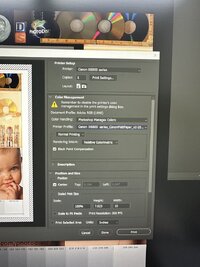
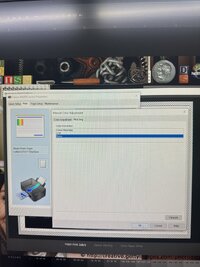
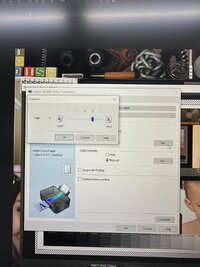
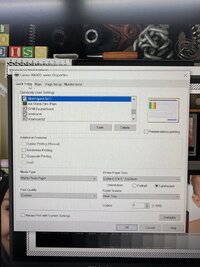
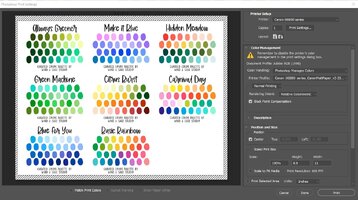
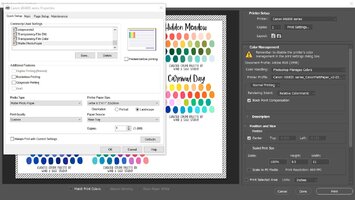
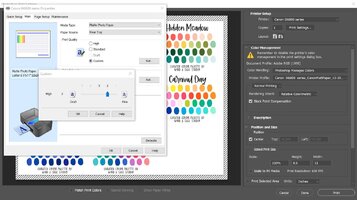
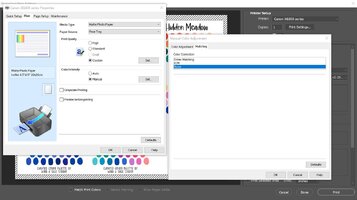
When printing the profiling targets, I used the same saved matte paper settings for both ccStudio and ColorMunki Photo. Today, I decided to delete all of my matte paper settings and re-save them. Surprisingly, that fixed the issue. I’m not sure why, but I recreated the settings exactly as before, made a new ICC profile using ccStudio, and it worked.

I’ve attached a photo showing the matte settings I had saved for years (MattePaper8.5x11) alongside screenshots of the new settings I created today (Matte Photo Paper). I don’t fully understand what changed, but I’m happy—and my older and new ccStudio profiles are now printing correctly again.
 

Attachments

  • IMG_3673.JPG
    IMG_3673.JPG
    124 KB · Views: 9
  • IMG_3672.JPG
    IMG_3672.JPG
    144.8 KB · Views: 9
  • IMG_3671.JPG
    IMG_3671.JPG
    125.2 KB · Views: 9
  • IMG_3670.JPG
    IMG_3670.JPG
    157.5 KB · Views: 10
  • Screenshot 2026-01-13 203857.jpg
    Screenshot 2026-01-13 203857.jpg
    166.1 KB · Views: 11
  • Screenshot 2026-01-13 203919.jpg
    Screenshot 2026-01-13 203919.jpg
    129.6 KB · Views: 12
  • Screenshot 2026-01-13 203957.jpg
    Screenshot 2026-01-13 203957.jpg
    127.8 KB · Views: 11
  • Screenshot 2026-01-13 204024.jpg
    Screenshot 2026-01-13 204024.jpg
    93.9 KB · Views: 11

tricey

Print Lurker
Joined
Jan 13, 2026
Messages
6
Reaction score
1
Points
1
Printer Model
Epson 3880, Canon PIXMA iX6820
you could have save money with paying Calibrite for something without any extra value....
Just to clarify one last time, I didn’t spend any money on Calibrite. I mentioned considering an upgrade, but I never purchased anything.

I was able to identify the issue on my end by deleting and recreating my saved printer settings, and ccStudio profiles are now working correctly again. I’m sharing the resolution here in case it helps someone else.
 
Top