I'm posting this added information that was sent outside of this forum. This will help others understand the details.
------------------------------------------------------------------------------------------------------------------------------------
From KMEC,...
Well, I cleaned the print head, but still have problems.
I printed and scanned your email so you will be able to see the problem.
The first line of the email (first paragraph), the top portion of the
letters are faded and barely there, then the next line prints fine. The
first line of the next paragraph, the top of the letters print fine and the
bottom of the letters are faded and barely there, then the next three lines
print fine. In the third paragraph, lines 1, 2, & 3 print fine and line 4
is faded at the top and the bottom of the letters print fine, then the next
two lines print fine and the next line prints ok at the top and faded at the
bottom of the letters...and so on.
Any clue what might cause this?
I have only used Canon ink cart and never refilled, only bought new. I am
the only one that uses this printer, so it hasn't been abused or anything.
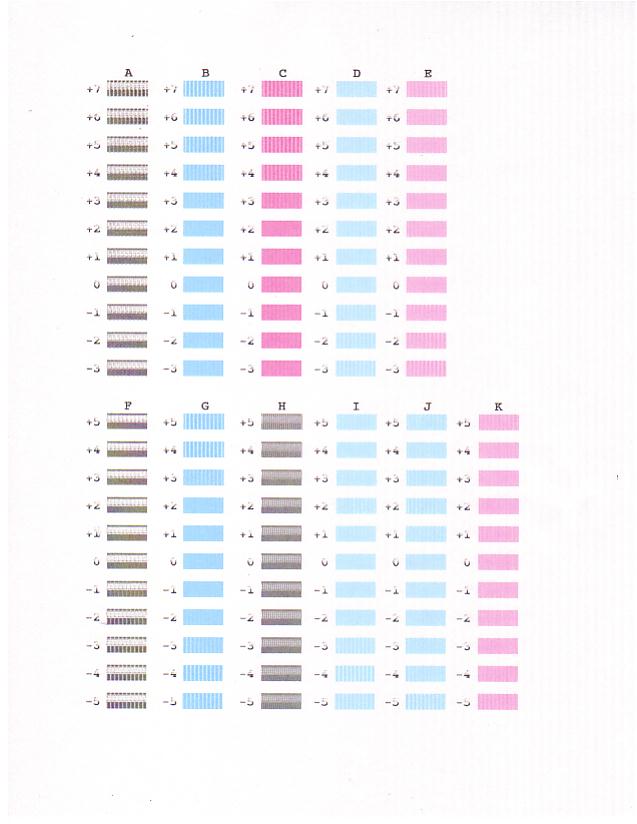
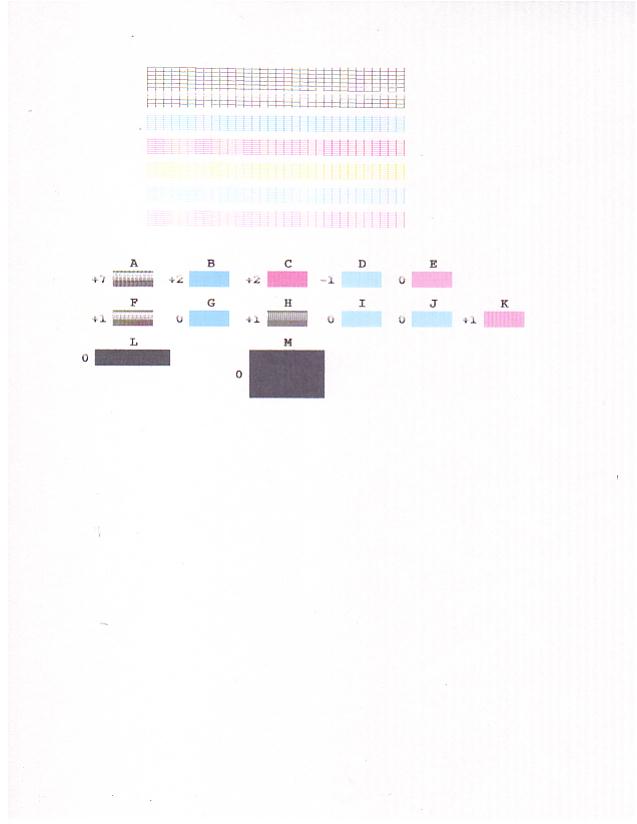
Also when I printed the Nozzle check, the "L" & "M" box printed perfectly,
but the "A" "F" & "H" boxes printed almost striped...see scan. Also the
numbers didn't print very good, but the letters did print good. Also I have
put in a new black ink cart after the head cleaning, just to be sure there
weren't any ink "boogers" in the old cart.
I've done:
Nozzle check - twice
Head Cleaning
Head Refreshing
Align Print Head
Roller Cleaning
I hope I have provided sufficient information, but please feel free to call
or email any additional questions.
It's really puzzling as it worked perfect last Sunday then Monday it began
printing like the example.
Again, Thanks for any help you can provide.
Here are the first images.
Nozzle check;