

Canon i560 horiz color banding on regular paper but OK on photo paper

Sport - start with hot water and give it time. Then you can try water/original windex combination, possobly with a little alcohol mixed in. I wouldn't force any high pressure compressed air through it. The first printhead I tried to clear had to be replaced. I think I was too agressive.
 
OK . Will do the gentle way first. Tks everyone.

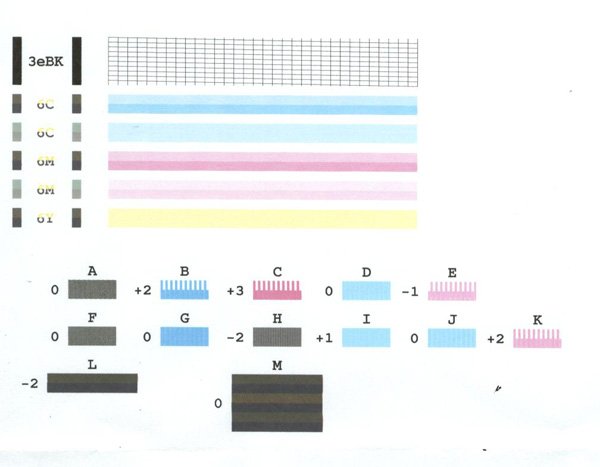
Here's the crappy nozzlechk pattern I get right now. Something is definitely choking the ink flow.

 
Manuchau or fotofreek can you please comment why you think I have such a horrible nozzlecheck pattern? Note the jagged pattern and inability to print the top half of the patterns . Tks
 
Looks like electrical problem to me, try cleaning the contacts with eraser and with some alcohol, also clean the printer contacts too not just the head. If it will not get better you can try to clean the timing strip with alcohol very gently
 
Smile said:
Looks like electrical problem to me, try cleaning the contacts with eraser and with some alcohol, also clean the printer contacts too not just the head. If it will not get better you can try to clean the timing strip with alcohol very gently
Where is the timing strip? Tks
 
sportflyer said:
Smile said:
Looks like electrical problem to me, try cleaning the contacts with eraser and with some alcohol, also clean the printer contacts too not just the head. If it will not get better you can try to clean the timing strip with alcohol very gently
Where is the timing strip? Tks
Timing strip is the white/transparent strip with black lines that head uses to track it's position. Do not damage it while cleaning.
 
I tried another printer head cleaning . This time more aggressively by injecting warm water thru the print head with a syringe. There does not seem to be any blockage . I then soaked the head in warm water for 1/2 hr and reinstalled the printhead after shaking off the water. I also cleaned the contacts and the timing strip with alcohol . I still get he same jagged nozzlecheck pattern as in post #12 above. Do I have an electrical problem ? What to do now ? I would hate to spend $ on a new printhead only to find that the problem lies in the drive circuits or loose connection to the print contacts on the printer side.

I can live with this for a while as I don't make many prints. Also the printer functions perfectly when using Photo paper ( no banding) or when I slow down the printing .

Any further advise? Tks
 
Back
Top