I did this over the last days - I used the i1Profiler parameters for a 702 patch sheet as provided above by
@pharmacist with the extnded range of gray spots, I'm interested to see what additional gray spots do to a profile, so I created a profile on two papers - a Netbit/Aldi paper 300 gr and a glossy 300 gr sold by Europrint/Ebay. I'm always waiting a day to let the dye inks drift a small amount before I do the actual scanning - with an i1Profiler robot arm . The patch sheets are printed with an ET-8550 printer with the ultraglossy paper selection.
And I got a surprise - the gamuts of the Netbit and the Europrint papers are identical - across the complete luminance range - the papers are just identical. That's good to know that there is a budget friendly substitute available for the Aldi/Netbit paper which was not offered anymore since years by Aldi.
I created another profile with i1Profiler - a target sheet which just fits onto an A4 paper sheet - this goes with 720 patches which is the maximum if I want to use the robot arm, the min patch size is 7,5 x 8 mm. The i1Profiler software just creates the necessary patches which includes a range of about 50+ gray patches at the right size of the sheet.

I now have 2 different profiles generated with patch sheets with 702 and 720 patch fields - one with the extended gray range and a standard i1Profiler profile, and both with a similar patch field count.
I now can do test prints with both of these profiles - onto the same paper, this could be an image or even a patchsheet which gets profiled, I'm printing with Qimage with the relative colorimetric - RC _ mode - with BPC on - this with both profiles.
I scanned these prints, and i1Profiler let me compare the prints and calculates several different statistical parameters for the deltas between each of the 702 color spots.
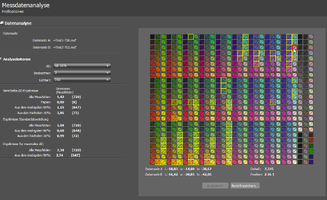
The program is showing the individual deltas when I move the cursor over one of the spots, the average DeltaE (76) of all 720 spots is 1.42 which is pretty good I think. The program as well highlights those 10% of spots which have the highest values - the max is 7.34 - the cursor at the top right is located there . The spots are highlighted wtih a yellow box round it. None of the gray patches exceed a DeltaE of 2, they are typically between 0.8 and 1.2. The gray spots are locaed mainly in the vertical columns 2B and 2C at the right sie of the patch sheet - mainly columns 2B and 2C.
This shows to me that both profiles - a standard 720 patch profile and a 702 patch sheet with additional gray patches deliver pretty much the same print output.
And I printed 2 B/W test images - by Keith Cooper - with both profiles, I can't see a difference, I specifically looked for the darker range - detail resolution , and I don't see a change in the color hue of the gray with different luminance values.
The data table shows a max DeltaE of 7.34 , this spot is located at the top right at the cursor location - detailed data is shown at the bottom of the patch sheet layout. The deltas at the adjacent spots are much lower. There are problably some errors in the data - from scanning or printing. It would be necessary for a lower error rate to use at least 2 actual prints , to scan them several times and average tthe data before the comparison is made. But since the gray spots don't exhibit such wide variations I don't see a reason to go such additional steps.




