

GordW
Getting Fingers Dirty
- Joined
- Jan 25, 2024
- Messages
- 11
- Reaction score
- 11
- Points
- 33
- Printer Model
- Canon Pro-10
I've been refilling my OEM cartridges, originally with Precision Colors and now InkPot/InkOwl inks and have been very satisfied with the results. That is, until I printed this image (exported .jpg image file, cropped below)...

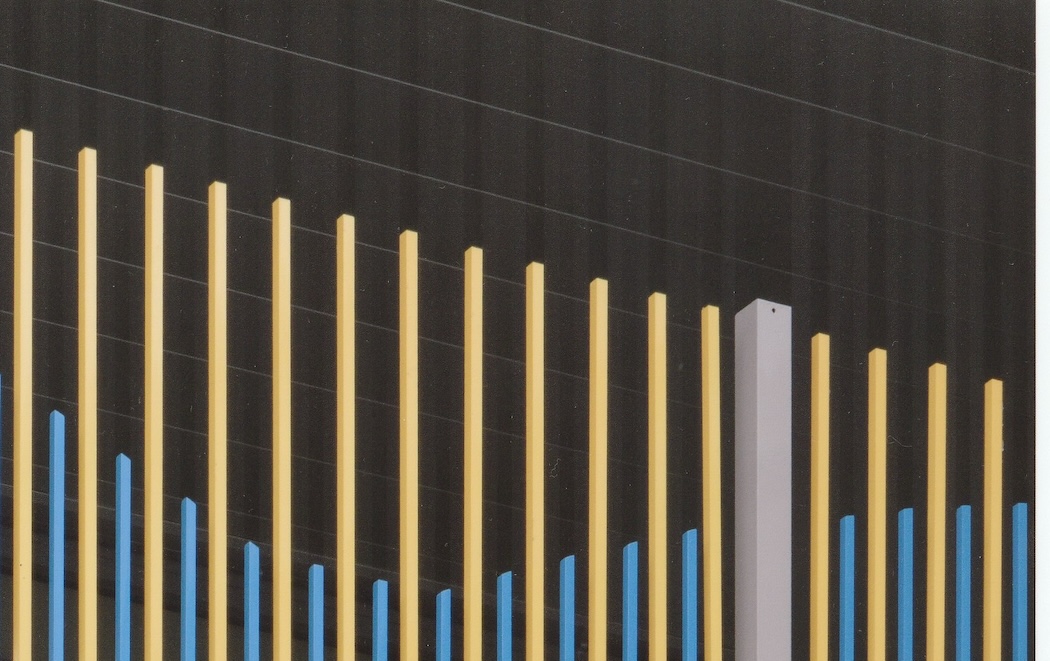
As you should be able to see from the following scan of the resulting print, there is (inverse?) banding above directly in line with the yellow the background is more black than where there is no yellow. The yellow (and blue) bars are 100% vertical. You might see a less noticible swath above the blue columns too. (Colours look OK on print, but this print didn't scan very well; low resolution used for demonstration purposes).
Swapping to OEM inks the banding disappears.
Is there an issue with the OEM cartridges I'm refilling, or the ink I'm using or is this normal for non-OEM inks....?
Thanks, in advance, for your assistance.
Gord
As you should be able to see from the following scan of the resulting print, there is (inverse?) banding above directly in line with the yellow the background is more black than where there is no yellow. The yellow (and blue) bars are 100% vertical. You might see a less noticible swath above the blue columns too. (Colours look OK on print, but this print didn't scan very well; low resolution used for demonstration purposes).
Swapping to OEM inks the banding disappears.
Is there an issue with the OEM cartridges I'm refilling, or the ink I'm using or is this normal for non-OEM inks....?
Thanks, in advance, for your assistance.
Gord


