[Tool] ChromIQ – a macOS and Windows GUI for ArgyllCMS printer profiling (v3.9.0)

pkk

Fan of Printing
Joined
Jan 4, 2011
Messages
98
Reaction score
42
Points
51
Location
St. Louis Mo.
Printer Model
Canon Pro100 Epson 3880, 9880
To be honest I don‘t know which places it checks for Argyll on windows. On macOS many people install it via homebrew and there it checks for this location and for example in the Applications folder because similar to you I have it placed there. When the check detects everything it is fine and you could not even create a chart if the location was wrong. That said I have no real ideas why this might happen.
Can you share a zip file with your ti1, ti2, ti3, tiff and icc file? I would let Claude have a look at this although I can’t promise this will give the right answer for the issue. I still wonder whether it might have something to do with the i1Pro3. Greame Gill seems to have mentioned something in the drivers notes that he hast tested it with a Rev.1 device and Rev.0 will not work well and newer Revs are not tested. Or something like that it was.
Hi again,
Attached are files you requested, one very successful, one not. I ran the Xrite diagnostic on my I1Pro and it passed. I also made a profile with my ColorMunki and it was not successful either. So far I've made two very good and five pretty bad ones. If we had a user here in the States with an I1Pro who was willing I could mail them the targets and see if another instrument would read them better. But the fact that they are either very good or very bad is weird.
Thanks again for all the work you are doing.
 

Attachments

  • Arg484_Pro1000_CanonFineArtMatte.zip
    1.4 MB · Views: 7
  • Arg506_Pro1000_CanonNatMatteV2 (2).zip
    1.5 MB · Views: 7

itsab1989

Fan of Printing
Joined
Feb 11, 2026
Messages
175
Reaction score
80
Points
60
Printer Model
Epson ET 8550, Canon Pro 300
I‘ll check it when I am at home. When you say the Colormunki profile was not successful either - how bad was it? A colorcast or like really really really bad?
 

itsab1989

Fan of Printing
Joined
Feb 11, 2026
Messages
175
Reaction score
80
Points
60
Printer Model
Epson ET 8550, Canon Pro 300
@pkk
I just remembered something that Alan made me aware of: in the build profile tab there is an option for media surface. Default for this is glossy. When I have done profiles myself in the command line I was not aware of this. But maybe setting this to matte might tweak things slightly (although I honestly don’t know).
Also how long did you let your targets dry before measuring?

With my ET8550 I noticed a magenta cast as well when using its default settings but printing with the profiles I have created eliminates this.
My profiles were made with the command line tools but the version of ChromIQ that you are using does nothing really different than this. You could try to use the command line and see if things would be different then (which would then hint about maybe a wrong command being handed over by ChromIQ) but I somehow doubt that after Nelsons extensive testing he would not have noticed this. I‘ll check your files when at home but I can’t promise any meaningful findings.

Oh which rendering intent did you use for printing?

Edit: I just noticed you are two people with probably different issues. I'll give the files to Claude anyway.
 
Last edited:

pharmacist

Printer VIP
Platinum Printer Member
Joined
May 29, 2007
Messages
3,173
Reaction score
1,829
Points
333
Location
Ghent, Belgium
Printer Model
SC-900 ET-8550 WF-7840 TS705
@itsab1989
That is perfectly ok for me: just take care the relative distance between date/printer/ink set/paper brand/media/resolution setting/profile name is kept. A text length that is same for media/ resolution setting and profile name is not very convenient: you want a (very) long text length for the profile name and a shorter text length for media/resolution setting.

Also take care the space bare shrinks relatively with the patch size you have chosen. A space bar of -a0.6 is perfectly ok for scanning and can sometimes ad an extra patch to a given row length.
 
Last edited:

pharmacist

Printer VIP
Platinum Printer Member
Joined
May 29, 2007
Messages
3,173
Reaction score
1,829
Points
333
Location
Ghent, Belgium
Printer Model
SC-900 ET-8550 WF-7840 TS705
I'm always looking to improve B&W printing on my ET-8550, and tried the 1944-patch chart with Canon Fine Art Smooth. This is a warm-tone, OBA-free paper that tends to have a magenta cast with the Epson inks, even after profiling.

The ChromIQ profile analysis was good, highest Delta E 1.27, average 0.25, but a test print had a heavy magenta-brownish push. I did a nozzle check and it was clear. Don't know what happened.

I also made a 1100-patch chart using a Print Prism profile as the refinement source, and that looks pretty neutral.

Can you tell me the modus operandi of your initial patch count and the secondary refinement target (how much patches in start profile and how much secondary profile and arguments in targen).

Did you check the media setting: be sure you have choosen the same media setting and resolution for both the target/secondary target and the final printing ? I have never seen this before even with a smaller target: I got pretty neutral greys even with a smaller patch count on difficult printers without grey inks and targets without extende greys (several rows of near neutrals around pure greys).
 

itsab1989

Fan of Printing
Joined
Feb 11, 2026
Messages
175
Reaction score
80
Points
60
Printer Model
Epson ET 8550, Canon Pro 300
@pkk From Claude:

▎ Hi,

▎ Good news first: your instrument and your targets are completely fine. The i1Pro passing X-Rite's diagnostic was correct, and there's no need to mail targets to anyone — another instrument would read them exactly the same.

▎ Here's what actually happened with the two jobs:

▎ The FineArtMatte profile is genuinely excellent — about as accurate as an RGB printer profile gets.

▎ The NatMatteV2 profile that you sent was not built from the measurement next to it. Your reading of that chart is actually very good — when I built a profile straight from your measurement data, it came out excellent too. The problem is that the .icc profile file you had was an older, leftover profile from before; it was never rebuilt from your final reading, so the profile and the measurement didn't match. A mismatched profile like that behaves badly even when the underlying measurement is perfect — which is exactly what you saw.

▎ Why this can happen: in ChromIQ, measuring a chart and building the profile are two separate steps. After you finish reading all the strips, the app guides you to the Build Profile tab — but it stops there on purpose, because that tab is where you can adjust the profile settings before creating the ICC. You then have to click Build Profile on that tab to actually generate (or regenerate) the profile. If that final "Build" click doesn't happen — for example after re-reading a chart — the folder keeps the previous profile, and that older one is what gets used.

▎ So the simple rule going forward: whenever you measure or re-measure a chart, finish by clicking "Build Profile" on the Build Profile tab to create a fresh ICC from that reading. That guarantees the profile always matches the measurement it came from.

▎ This also explains the "either very good or very bad" pattern you noticed — it was never the i1Pro vs. the ColorMunki, and never the paper. The good ones were freshly built from their measurement; the bad ones were carrying an old, mismatched profile.

▎ I've already rebuilt a correct NatMatteV2 profile from your measurement — please give it a try. It should print as nicely as your FineArtMatte one.

▎ Thanks again for the detailed files; they made it easy to pin down.
 

Attachments

  • Arg506_Pro1000_CanonNatMatteV2_FIXED.icc.zip
    473 KB · Views: 4

pharmacist

Printer VIP
Platinum Printer Member
Joined
May 29, 2007
Messages
3,173
Reaction score
1,829
Points
333
Location
Ghent, Belgium
Printer Model
SC-900 ET-8550 WF-7840 TS705
There is a bug in the page setting: I tried to define A4 paper size, but it jumps back to A2 all the time

1782715035319.png


Thus when loading ti1/pxf I get this:

1782715069327.png
 

pharmacist

Printer VIP
Platinum Printer Member
Joined
May 29, 2007
Messages
3,173
Reaction score
1,829
Points
333
Location
Ghent, Belgium
Printer Model
SC-900 ET-8550 WF-7840 TS705
I don't see the margin settings for patch width/height either:

1782715713688.png
 

itsab1989

Fan of Printing
Joined
Feb 11, 2026
Messages
175
Reaction score
80
Points
60
Printer Model
Epson ET 8550, Canon Pro 300
I am adding a save button in the settings as well. for some reason this was missing. but you can change it in the create chart tab as well and save defaults from there
 

hackensacker

Newbie to Printing
Joined
Jun 19, 2026
Messages
4
Reaction score
2
Points
5
Printer Model
ET-8550
Can you tell me the modus operandi of your initial patch count and the secondary refinement target (how much patches in start profile and how much secondary profile and arguments in targen).

Did you check the media setting: be sure you have choosen the same media setting and resolution for both the target/secondary target and the final printing ? I have never seen this before even with a smaller target: I got pretty neutral greys even with a smaller patch count on difficult printers without grey inks and targets without extende greys (several rows of near neutrals around pure greys).
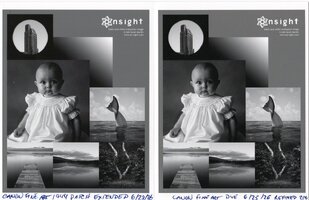
Well, I seem to have a knack for triple-checking my settings, getting unexpected results, and concluding that something is wrong, only to try it one more time and seeing the problem disappear. Here's a new print from the same 1944-patch profile, settings identical to before, looking very close to the 1100-patch with refinement.
 

Attachments

  • img20260629_00481372.jpg
    img20260629_00481372.jpg
    156.6 KB · Views: 16
Last edited:
Top