Canon Pro-200 not printing PC/M/Y/PM

Tambotan

Print Lurker
Joined
Jun 3, 2026
Messages
6
Reaction score
0
Points
1
Printer Model
Canon Pro-200
Hi all, first time poster

I bought myself a Pro-200 a few years ago, used it a bit and then put it in storage without thinking about it too much. Fast forward to last week when I finally decided to stump up the extortionate amount needed to replace all the inks. I'm sure you can guess what is coming next, I ran a nozzle check and none of the photo printing nozzles were working properly
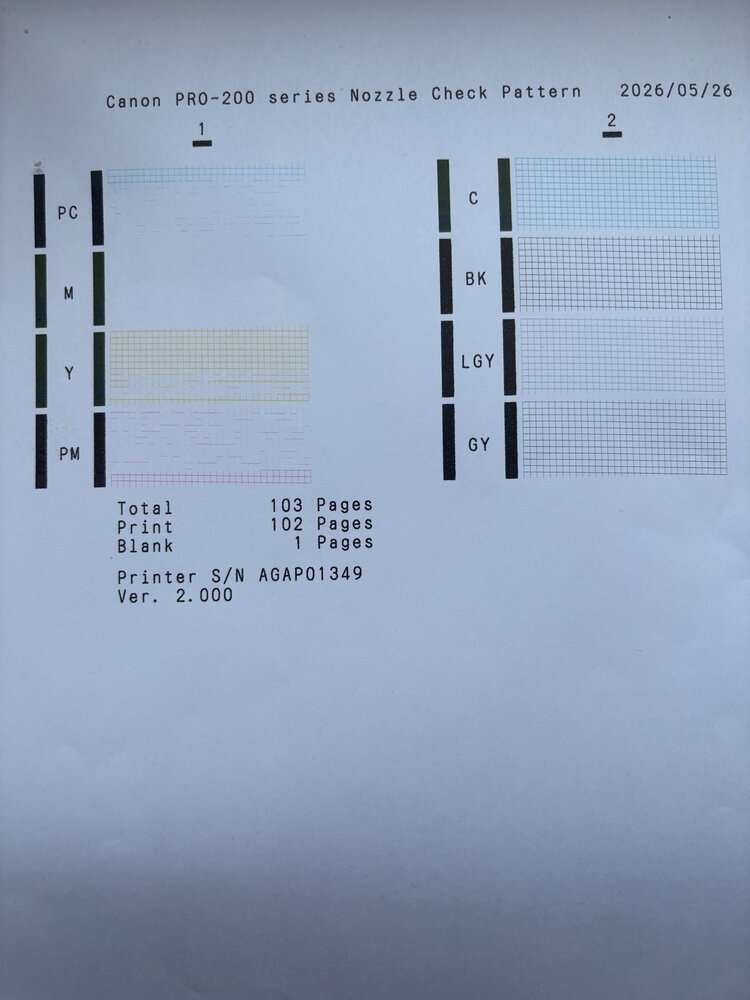
IMG_8687 - Copy.jpg


I found what I thought was a helpful Youtube video and have just spent the last 2 days cleaning the print head with a mix of distilled water/isopropanol alcohol and household ammonia as suggested. Lots of old ink came out and eventually the little sponges where the cartridges fit in all went grey and no more ink was coming out.

I dried it all out over 24hrs and excitedly printed a new nozzle check (after running a clean 2x as I saw suggested somewhere)
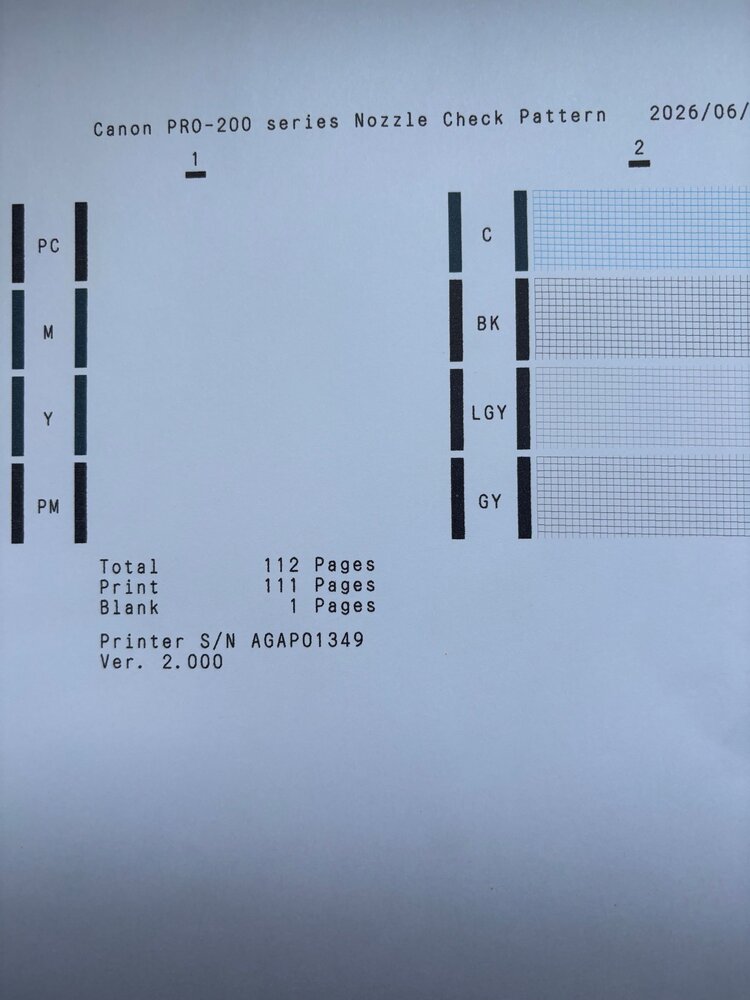
IMG_8689 - Copy.jpg


Hmm 🤦‍♂️

I also tried a deep clean of just those colours but it didn't help.

I presume at this point the print head is a write off but before I spent the, frankly unbelievably, £170 for a replacement can anyone tell me please if that is likely to fix the issue?

I'd hate to spend £120 on ink and then another £170 on a print head and still not be able to print some pictures off for my daughter!

Many thanks for any help!

Ollie

*EDIT* Sorry I should have said, the inks I bought were genuine. I bought the whole set so every cartridge has been replaced
 
Last edited:

The Hat

Printer VIP
Platinum Printer Member
Joined
Jan 18, 2010
Messages
16,219
Reaction score
9,151
Points
453
Location
Residing in Wicklow Ireland
Printer Model
Now have 3 Ender-3 V3 Plus SE/
Many thanks for any help!

Ollie
Try removing all the carts and print head and placing the print head in a small bowl of warm water with some fairy liquid in it, let it stand for several hours and then repeat with warm water and the washing up liquid again.

Leave it overnight and then in the morning dry out the head giving it a good shaking and possibly using a hair dryer on it for a few minutes, concentrating on the back of the head where the electronics are. Don’t over heat..

While you have the head out splash or spray the purge unit with a lot of W5 window cleaner, give the whole area a good splashing then using kitchen paper towels mop up as much as you can, then this is the important bit, flood both pads with window cleaner..

Now install the head and cartridges and let the printer do its own routine and then when it stops, run one nozzle check and see how much different it is compared to your previous ones, it should be a lot better, if not completely 100% clear, then run a normal head clean and let the printer sit for half an hour..
Your next nozzle check should be perfect.. :weee
P.S. Keep ammonia away from the head…
 
Last edited:

Tambotan

Print Lurker
Joined
Jun 3, 2026
Messages
6
Reaction score
0
Points
1
Printer Model
Canon Pro-200
Hi there,

Thanks ever so much for coming back to me! I looked into it on Google but I couldn't find out what the "purge unit" is? I could see that as a spare part for Pro 2000s etc. but I have a Pro-200. Would you mind pointing me to what I need to squirt with W5 window cleaner please? Is it this thing (found in someone else's post on the Canon site)

1780522127320.png


If so, is there an easy way to get to it because it would be quite difficult to get in there on mine for some reason, it is tucked away in a corner and I'm not sure how I would squirt stuff onto it without getting it everywhere. I didn't want to start pulling on it and damage something. I couldn't see mention of it in the manual.

Many thanks

Ollie
 

Tambotan

Print Lurker
Joined
Jun 3, 2026
Messages
6
Reaction score
0
Points
1
Printer Model
Canon Pro-200
Sorry, here's a picture from my actual printer. Hopefully you can see the white unit would be quite difficult to get to, unless I'm missing a trick?

1780523164884.png


That black cover above it with CLI-65 in white on it would be completely in the way. I guess I might be able to soak a cloth and then poke it in there?

Cheers

Ollie
 

donaldolsen

Printing Apprentice
Joined
May 4, 2026
Messages
13
Reaction score
2
Points
18
Location
United States
Printer Model
Canon i560
Hi all, first time poster

I bought myself a Pro-200 a few years ago, used it a bit and then put it in storage without thinking about it too much. Fast forward to last week when I finally decided to stump up the extortionate amount needed to replace all the inks. I'm sure you can guess what is coming next, I ran a nozzle check and none of the photo printing nozzles were working properly

View attachment 18786

I found what I thought was a helpful Youtube video and have just spent the last 2 days cleaning the print head with a mix of distilled water/isopropanol alcohol and household ammonia as suggested. Lots of old ink came out and eventually the little sponges where the cartridges fit in all went grey and no more ink was coming out.

I dried it all out over 24hrs and excitedly printed a new nozzle check (after running a clean 2x as I saw suggested somewhere)

View attachment 18788

Hmm 🤦‍♂️

I also tried a deep clean of just those colours but it didn't help.

I presume at this point the print head is a write off but before I spent the, frankly unbelievably, £170 for a replacement can anyone tell me please if that is likely to fix the issue?

I'd hate to spend £120 on ink and then another £170 on a print head and still not be able to print some pictures off for my daughter!

Many thanks for any help!

Ollie

*EDIT* Sorry I should have said, the inks I bought were genuine. I bought the whole set so every cartridge has been replaced
If the printer sat unused for years, there's a good chance the printhead is still clogged internally. A replacement printhead would likely fix it, but unfortunately there's no guarantee. I'd post the nozzle check pattern as well, as it can sometimes reveal whether it's a clog or an actual printhead failure.
 

Tambotan

Print Lurker
Joined
Jun 3, 2026
Messages
6
Reaction score
0
Points
1
Printer Model
Canon Pro-200
Hi Donald

Thanks a lot for coming back to me, the nozzle check patterns are in the first post. It got worse rather than better after a clean :/
 

The Hat

Printer VIP
Platinum Printer Member
Joined
Jan 18, 2010
Messages
16,219
Reaction score
9,151
Points
453
Location
Residing in Wicklow Ireland
Printer Model
Now have 3 Ender-3 V3 Plus SE/
Sorry, here's a picture from my actual printer. Hopefully you can see the white unit would be quite difficult to get to, unless I'm missing a trick?
As your purge unit is hard to reach alright, you can use a syringe or turkey baster to reach in, don’t be afraid of hitting other pasts because it won’t do any harm , to pat dry the area use a piece of stick wrapped in kitchen tissue will do the job..

Don’t forget to flood the purge unit after you have splashed everything and pat dried it.. The whole area in and around the purge unit gets a bit mucky after a while..:)
 

Tambotan

Print Lurker
Joined
Jun 3, 2026
Messages
6
Reaction score
0
Points
1
Printer Model
Canon Pro-200
Thanks again!

The mystery deepens! I've spent the last 48hrs following The Hat's instructions from the second post. More ink came out, I cleaned the purge unit etc. Both pads were black before but the W5 did a good job of cleaning them up. I soaked the pads as suggested

1780671714919.jpeg


Ran a nozzle check but exactly the same as before 😥 No print at all on the PC/M/Y/PM side of the nozzle check.

I then decided to run a print head clean on those colours (you can pick one set or the other), ran it but it made no difference. However, it clearly passed ink through as the pad is now full of ink?!

1780671850779.jpeg


I'm a bit stumped now! Any further ideas?

Is this likely to be a print head issue? Obviously I was getting some print from that head before, it was only M that wasn't printing, the other 3 were at least producing some lines. Now I'm getting nothing at all. The print head is extremely expensive but if there is a 90% chance it is that it is going to be a lot cheaper than throwing away a printer that I've had less than 120 prints out of!

I appreciate there are no guarantees but what do you think?

Cheers

Ollie
 

The Hat

Printer VIP
Platinum Printer Member
Joined
Jan 18, 2010
Messages
16,219
Reaction score
9,151
Points
453
Location
Residing in Wicklow Ireland
Printer Model
Now have 3 Ender-3 V3 Plus SE/
I appreciate there are no guarantees but what do you think?
Last chance.. try flooding the purge pads with window cleaner, I mean over flow..

Then watch to see if the liquid stays there, this will tell whether or not the purge unit is working properly, if it empties straight away then one or both tubes have be disconnected.. That’s a bitch of a job getting them back on, but worth it..

If the purge unit holds the liquid till you close the top lid, then your print head may be damaged beyond repair..

When you having print issues, only print nozzle checks till they are 100% again, all other printing will damage the print head..

Try posting another nozzle check please..
 

Tambotan

Print Lurker
Joined
Jun 3, 2026
Messages
6
Reaction score
0
Points
1
Printer Model
Canon Pro-200
Thanks again mate. Here's the purge pads around a minute after I drenched them with W5 (I bought myself a syringe with plastic pipe as suggested, it worked a treat!)

1780691696868.jpeg


At least I'm getting better at this photography! Hopefully you can see it is fully drenched and hasn't leaked away.

Here's the nozzle pattern


IMG_8702.jpg


If you look at the first post the initial nozzle check was actually better than it is now but was still completely missing M. However, it looks like I somehow made it worse during my initial cleaning attempts as now it doesn't output anything at all from that side, looking at the page under a torch with a loupe there is nothing on the page at all on the 1 side. The thing I still don't understand is how the purge pads ended up covered in ink after the head cleaning attempt but yet the nozzle check doesn't show anything at all!?

There probably isn't anything else damaged on the printer as it has just sat under a dust cover for the last couple of years, not even moved really. However I'm leery of spending another £170 on a head on top of the £120 already spent on ink (half of which is now gone 🤦‍♂️)

However, £170 is still a lot cheaper than buying a new printer so is it likely a new head will fix it? I will only buy OEM obviously.

Thanks for all the help

Ollie
 
Top