Just saying hello

Hillmaster

Printing Apprentice
Joined
Mar 31, 2026
Messages
5
Reaction score
2
Points
10
Printer Model
Epson1500W,WF7710,ET2600
Hi everyone. It's been a week or so since I joined the forum as I'm so busy I haven't had much time to write.
First off, I have 3 Epson printers - a clunky 6 year old ET-2660 that still works well, providing my lady wife with a means of printing her verses for all the greetings cards she makes. She does quite a bit of crafting stuff.
Then I have 2 machines for myself - a Workfoce WF-7710 and a Stylus Photo 1500W, which has been lying in the garage for over 7 years with a clogged head. I eventually got time to bring it in from the cold last month and give it a really good strip down and service, which resulted in bringing it back to life!
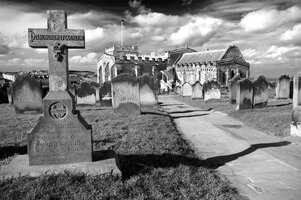
I'm a printer by trade (now retired) and have had a passionate interest in photography since I was 8 years old, when my Aunt gave me my first camera - a grey plastic Kodak Brownie 127! I've progressed since then, and now, after many years of working in colour, I want to re-vitalise some of my images in black and white. I have been studying Paul Roark's website and am now on the verge of making a 6 part set of mono pigment inks. The only problem I'm having is with the surfactant side of things, and I wonder if anyone out there in the forum can help. Living in the UK I can't seem to source any Photo Flo and/or Edwal surfactants and have seen a few posts regarding the use of "Jet Dry" dishwasher rinse aid, or GLOP as a ready made base - I would prefer to make my own though, and have had plenty of experience making up developers, fixers etc, However, if anyone can help me in my quest for info on this I would most grateful. Sorry if I've gone on a bit, but I don't get out much! :weee Pic of St Mary's Church, Whitby

 

Attachments

  • _IGP1392Mono2WEB.jpg
    _IGP1392Mono2WEB.jpg
    288.3 KB · Views: 21

Hendrik

Newbie to Printing
Joined
Feb 27, 2026
Messages
7
Reaction score
4
Points
8
Location
Vienna
Printer Model
Epson R2880, Epson P900
Since the surface tension of the ink is an important parameter for the proper functioning of inkjet printers, it might be risky if you use a base fluid which has not been properly tested or characterized. With GLOP (check OctoInkjet) you are on a safer side.

Best
Hendrik
 

Hillmaster

Printing Apprentice
Joined
Mar 31, 2026
Messages
5
Reaction score
2
Points
10
Printer Model
Epson1500W,WF7710,ET2600
Many thanks for noticing my post, Hendrik! If you don't mind me asking, are you saying that rather than start messing around with the multitude of ingredients such as Photo-flo, Tergitol et al, I would be better off initially by using GLOP as the clear base and then once I gain more confidence, and possibly manage to get hold of the other ingredients, branch out from there? If so, that would make life much simpler, initially, and I could get rolling and start printing some of my black and white conversions.;)
 

Hendrik

Newbie to Printing
Joined
Feb 27, 2026
Messages
7
Reaction score
4
Points
8
Location
Vienna
Printer Model
Epson R2880, Epson P900
Many thanks for noticing my post, Hendrik! If you don't mind me asking, are you saying that rather than start messing around with the multitude of ingredients such as Photo-flo, Tergitol et al, I would be better off initially by using GLOP as the clear base and then once I gain more confidence, and possibly manage to get hold of the other ingredients, branch out from there? If so, that would make life much simpler, initially, and I could get rolling and start printing some of my black and white conversions.;)
I think Paul Roark has published various ink sets and the composition of different base fluids. I would stick to one of those approved formulations. Currently, I am using the GCVT ink set of Paul Roark with GLOP as the base fluid. It works for me in a R2880.
 

Hillmaster

Printing Apprentice
Joined
Mar 31, 2026
Messages
5
Reaction score
2
Points
10
Printer Model
Epson1500W,WF7710,ET2600
GCVT ink set of Paul Roark
That sounds good to me. I've already started just as you did, by getting the various substances together, along with 2 decent sets of digital scales - one rated at 300grams max and the other at 500grams. I've already sourced and received my ink and the GLOP arrived this morning. Still in the process of doing more research/reading etc, In fact, I have just read your page on Carbon printing using that particular inkset. I think in maybe a week or so I should be sufficiently armed with enough knowledge and materials to actually get up and go! When I do take the plunge, I will be reporting in with my results - be it success or failure, hence the large amount of study which I think is warranted when doing something like this. Many thanks for your comments in the meantime Hendrik. BTW, I meant to ask you - did you just email Paul Roark asking for the profiles or are they available for download in a particular place on his site? I have trawled his site , gleaning as much info as I can for obvious reasons. I don't want to be going off half cock as it were! Can't wait to get started! :drool
 

Hendrik

Newbie to Printing
Joined
Feb 27, 2026
Messages
7
Reaction score
4
Points
8
Location
Vienna
Printer Model
Epson R2880, Epson P900
Dear Hillmaster:
I started with profiles which Paul Roark provided for Epson 7800, because my R2880 has the same ink set. I could achieve good results if I used a profile for a similar paper. But then I wanted to make my own profiles (quad files). Since I found using QTR for creating quad files can require quite a number of iterations which may have left some users frustrated, I have made my own program "MakeQuad (MQ)" to create quad files. It is free for private use. The advantage for a beginner is that you can practically create a linearly printing quad file by one click (MQ does the job for you). Typically, you do not even have to linearize the quad, it prints linearly out of the box. You can then use this quad file to print with QTR. Let me know if you need any help with MQ.

Best regards,
hk
 

Hillmaster

Printing Apprentice
Joined
Mar 31, 2026
Messages
5
Reaction score
2
Points
10
Printer Model
Epson1500W,WF7710,ET2600
Dear Hillmaster:
I started with profiles which Paul Roark provided for Epson 7800, because my R2880 has the same ink set. I could achieve good results if I used a profile for a similar paper. But then I wanted to make my own profiles (quad files). Since I found using QTR for creating quad files can require quite a number of iterations which may have left some users frustrated, I have made my own program "MakeQuad (MQ)" to create quad files. It is free for private use. The advantage for a beginner is that you can practically create a linearly printing quad file by one click (MQ does the job for you). Typically, you do not even have to linearize the quad, it prints linearly out of the box. You can then use this quad file to print with QTR. Let me know if you need any help with MQ.

Best regards,
hk
Many thanks for getting back to me , Hendrik. I may appear to be offline or very quiet at times - this is because I am still studying the subject and also I am a great Grandad with a large family who make excessive demands on me, hehehe! Seriously though, I really welcome what you've mentioned in your last post, and over the weekend I'll put some time aside to look more deeply into both QTR and your MakeQuad addition. I'm just getting my head round the linearization part of things, and at first it seemed rather complex and mystifying, but upon further reading in a quiet room (which is quite difficult here sometimes!) it suddenly started dropping into place. As most people get older, they tend to start slowing down but at 73 I've found that keeping my brain working with fun problems such as this, is keeping me from going off the boil. Great fun can be had as an old age pensioner!!
:weee:celebrate
 
Top