A basic guide (see post #1) to setting up ARGYLL CMS profiling on your computer

W. Fisher

Print Addict
Joined
Aug 13, 2015
Messages
231
Reaction score
104
Points
173
Printer Model
Epsons, Canons, Brother.
Fwiw, I had to remove Argyll as it was causing some USB port issues with the x-rite and Calibrite software. Seems it was scanning the USB port and the connected device when it was in operation with other software causing an issue, almost like double-profiling.

I also had some issues with my old ColorMunki Photo with the old x-rite software on Windows 11. Was getting some green cast. Seems that cleared up when I paid the $69 for the newer version 3.0.4 of the Calibrite Profiler.
 

Tony4597

Printer Guru
Joined
Jan 20, 2021
Messages
141
Reaction score
84
Points
115
Location
Cheshire, UK
Printer Model
Epson Surecolor SC P800
........

I tried it. With this command, prints start shifting slightly yellow, especially noticeable on faces.Do I not need the -l flag at all in colprof for my situation? And should I keep -l 330 in targen?
I understand that you are concentrating here on producing a good paper profile, but you have not mentioned your print viewing conditions and monitor calibration which is obviously a very important factor in a colour managed workflow.

My assumption is that you are aiming at a WYSIWYG situation with your monitor matching your prints or at least close enough to make an accurate assessment of how the print will look?

To do this accurately requires the correct monitor calibration and profiling and print viewing conditions with the print illuminated ideally in the same conditions they will be when actually viewed.

When calibrating your monitor for use in soft proofing you may find that you need to choose D65 or close as this is likely to be closer to most modern printing paper whites although you may find D58 or D60 to be closer match.
The ideal monitor White Point is the one that gives a visual match to the print when illuminated by the 'correct' light source

However when producing your print profiles ICC standards assume D50 (5000k) and this should be your starting point.

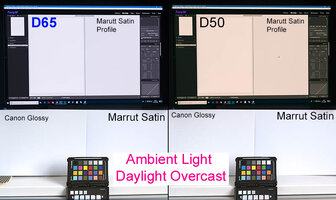
Attached two images the first being the monitor conditions set to D65 and D50 as a composite with two different papers sitting underneath each monitor. The shots illuminated by daylight in both cases. While not presented as being 100% colour accurate neither monitor setting is an exact match for the paper type, however it does demonstrate the difference clearly showing the importance of this step in workflow management.

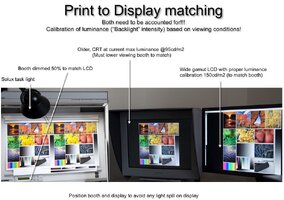
The second image is by Andrew Rodney aka Digital Dog (colour management guru). I am sure he will not mind my posting it here. This demonstrating the importance of illuminating the print correctly for evaluation.

Bottom line is that if your monitor white does not match your paper white (and to take it further contrast range) when the print lit for viewing then you have zero chance of a good print to screen match with even the most accurate ICC paper profile

To take this even further it is not unknown to have several different monitor profiles one for each type of paper in use or when working certain conditions e.g.ISO standards

 

Attachments

  • D65_D50_ Printing.jpg
    D65_D50_ Printing.jpg
    101.7 KB · Views: 77
  • Print_to_Screen_Matching.jpg
    Print_to_Screen_Matching.jpg
    92.2 KB · Views: 77
Last edited:

Tony4597

Printer Guru
Joined
Jan 20, 2021
Messages
141
Reaction score
84
Points
115
Location
Cheshire, UK
Printer Model
Epson Surecolor SC P800
Fwiw, I had to remove Argyll as it was causing some USB port issues with the x-rite and Calibrite software. Seems it was scanning the USB port and the connected device when it was in operation with other software causing an issue, almost like double-profiling.
...

Yes, the problem is that Argyll installs its own driver, although you can use Device Manager to swap between the drivers if you want to use the X Rite software.
It has been documented by Graeme Gill
Using Argyll drivers with existing OEM drivers:

If you currently have applications other than Argyll accessing your USB connected instrument, then you will have to manually install the Argyll driver, and then switch back and forth between the Argyll and other drivers if you want to switch between applications.
http://www.argyllcms.com/doc/Installing_MSWindows.html
 

Alan G

Getting Fingers Dirty
Joined
Jul 15, 2017
Messages
13
Reaction score
8
Points
35
Location
Bethesda, Maryland
Printer Model
Epson 3880
I think that my 14 year old i1 Pro Rev D has gone bad. I had not been doing much profiling and missed out on the exchange program last year when I could have updated to an i3 Pro for a reduced price. I picked up Canson Arches 88 and BFK Rives Natural for a Canon Pro -1000. I installed a brand new inkset and followed my normal Argyll workflow that has worked well in the past. The two profiles were just awful. With all the matte papers that I have worked with in the past gamuts range from 480 to 520. These are both about 410 or 20% smaller. Some of the colors are really bad when I use the Onsight test image. The X-Rite diagnostic program rejects my i1 Pro as not supported and of course nobody provides service on this anymore. What was really weird is that the standard errors from colprof were in line with past profiling. Max = 1.8, avg = 0.264 and RMS = 0.33. The gamut of this paper is 409 and the black and white points are as expected from iccgamut

Does anyone have an idea about what might be going on other than a bad spectro? Is there anyway to test the spectro using Argyll tools. I can stick with the Canson profiles which are very good. I cannot rationalize purchasing a new i13 Pro as I don't do much profiling.
 

Alan G

Getting Fingers Dirty
Joined
Jul 15, 2017
Messages
13
Reaction score
8
Points
35
Location
Bethesda, Maryland
Printer Model
Epson 3880
I think that my 14 year old i1 Pro Rev D has gone bad.
You can ignore my "problem" which turned out to be user error. I had not done any profiling in so long that I simply forgot to turn off color management in the Canon print driver. I was profiling targets where the color was managed by the printer!! All is well now.
 
Top