........
I tried it. With this command, prints start shifting slightly yellow, especially noticeable on faces.Do I not need the -l flag at all in colprof for my situation? And should I keep -l 330 in targen?
I understand that you are concentrating here on producing a good paper profile, but you have not mentioned your print viewing conditions and monitor calibration which is obviously a very important factor in a colour managed workflow.
My assumption is that you are aiming at a WYSIWYG situation with your monitor matching your prints or at least close enough to make an accurate assessment of how the print will look?
To do this accurately requires the correct monitor calibration and profiling and print viewing conditions with the print illuminated ideally in the same conditions they will be when actually viewed.
When calibrating your monitor for use in soft proofing you may find that you need to choose D65 or close as this is likely to be closer to most modern printing paper whites although you may find D58 or D60 to be closer match.
The ideal monitor White Point is the one that gives a visual match to the print when illuminated by the 'correct' light source
However when producing your print profiles ICC standards assume D50 (5000k) and this should be your starting point.
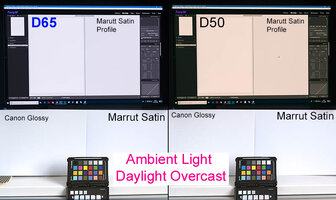
Attached two images the first being the monitor conditions set to D65 and D50 as a composite with two different papers sitting underneath each monitor. The shots illuminated by daylight in both cases. While not presented as being 100% colour accurate neither monitor setting is an exact match for the paper type, however it does demonstrate the difference clearly showing the importance of this step in workflow management.
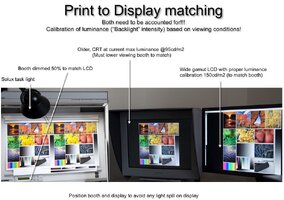
The second image is by Andrew Rodney aka Digital Dog (colour management guru). I am sure he will not mind my posting it here. This demonstrating the importance of illuminating the print correctly for evaluation.
Bottom line is that if your monitor white does not match your paper white (and to take it further contrast range) when the print lit for viewing then you have zero chance of a good print to screen match with even the most accurate ICC paper profile
To take this even further it is not unknown to have several different monitor profiles one for each type of paper in use or when working certain conditions e.g.ISO standards