
Script for Printer Calibration on Windows, MacOS snd Linux (free to use and modify)

knowing

Getting Fingers Dirty
Joined
Oct 24, 2025
Messages
72
Reaction score
10
Points
30
Printer Model
HP CLJ5550, Brother MFC-9460
If anyone using the script has suggestions on how the menu for Colormunki or other instruments should be set up with good target choices, feel free to post it on the forum. Then others may have benefit from your experience and knowledge. See menu option 1.

Settings for Target choices for menu for "other instruments" (other than Colormunki) is incomplete, so good suggestions would be great to complete the menu.

Cheers,
K
 
Last edited:
knowing

Getting Fingers Dirty
Joined
Oct 24, 2025
Messages
72
Reaction score
10
Points
30
Printer Model
HP CLJ5550, Brother MFC-9460
Hi all,
Today I tried the Pre-made target:
"CM-Interm-A4-2070p-10pages-w13.0mm-14x15_Modified-Atkinson1728-randomized"

I go a lot of cases where colprof detects that I am reading some other row than I am actually reading. Since this target is generated from a ti1 file and randomized, I suspect that it is sub-optimal placement of patches that cause this (the number of strips does not help either). Does anyone know how to reduce this? I think this target has a lot of potential, so it is very annoying to get this message all the time.

If anyone wants to try this target, I suggest rerunning printtarg with the command I provided in the "Commands.txt" file, and if you have success with that version, that you please post the target images and ti2 file, so that I can update the one in my script. I probably won't try to read this large target again and again to test it, so help from the forum would be appreciated it any of you try it.

When I tried "CM-Interm-A4-1168p-5pages-w12.5mm-15x16_TC918+Spyderprint_grays-randomized" last week, there was almost no such issue. The current version was updated yesterday, so I have not tried that yet.

If we find a good ranomized combination, is the right way to do it to freeze the seed number for the chart?

Any feedback from using the script is also appreciated. Until now, only one person has found the script useful and given feedback on the forum.

Thank you.

Cheers,
K
 

knowing

Getting Fingers Dirty
Joined
Oct 24, 2025
Messages
72
Reaction score
10
Points
30
Printer Model
HP CLJ5550, Brother MFC-9460
Perhaps slightly off-topic, but if ever you do feel inclined to port this to Windows, try passing the whole palava to Anthropic Claude and ask him very nicely to do it for you. I used to use a homebrew bash script for profiling - not so different from yours - but recently had Claude convert it to python which it did remarkably well - albeit as ~1000 lines of code. I'd post a link to the (semi) final version here but it contains numerous hard-coded references to my filesystem which would probably confuse things - and is something that I should someday rectify. But if it ain't broke ... I can't help with a windows port since I don't use windows. Reach out 1:1 if you want further thoughts ...
R/

Hi @riclin, and @pharmacist ,

I made the effort to port the wholel script to python, so it should now work on Windows, MacOS and Linux. I hope there is little bugs, as I do not have a Windows computer to test on, and limited tesing has been done on Linux. Please give feedback if bugs are found.

This is a major update, not major in functionality, although I did make improvements, but due to the large effort to prot the bash command script to python. Both scripts are basically identical in functionality and both are available. For those that are on MacOS or Linux may then have the choice to use the bash command script, if python scirpts are ailen to you.

See Argyll_Printer_Profiler (version 1.3.0)

Since I made this effort, I hope more people will be able to test it and give your thoughts, and if it helped your profiling efforts.

Cheers,
K
 

knowing

Getting Fingers Dirty
Joined
Oct 24, 2025
Messages
72
Reaction score
10
Points
30
Printer Model
HP CLJ5550, Brother MFC-9460
Hi All,
Since I have not gotten any feedback on how the script is running for windows I can only assume it works ok.
Also, regarding menu items for other instruments for target generation (menu option 1), no suggestions have been made. Thus, I have released a new small update v.1.3.2, which includes three i1Pro target generation options for A4 and Letter.

Make sure to read the Installation instructions page and the Getting Started section:
Argyll_Printer_Profiler so that you update the paths required for your platform (Window, MacOS or Linux). The default in the ini-file is set to MacOS paths.

The update includes:
  • Setup File Improvements (Argyll_Printer_Profiler_setup.ini)
    • Added commented Windows path examples for PRINTER_PROFILES_PATH, PRECONDITIONING_PROFILE_PATH, and PRINTER_ICC_PATH.
    • Under main menu option 1: Revised "Other Instruments" menu options (1–6) with target creation options for i1Pro instrument as example.
  • Documentation Overhaul
 
Last edited:

itsab1989

Newbie to Printing
Joined
Feb 11, 2026
Messages
5
Reaction score
3
Points
5
Printer Model
Epson ET 8550, Canon Pro 300
I was planning to do some testing last week but life and work got in the way.
But when I was printing a photo yesterday I noticed a somewhat magenta cast on the printed image no matter if I used Epsons ICC profile for the paper or a profile from a guy on Youtube (Keith Cooper in case you have heard of him).
So I thought it might be a good opportunity to create another ICC for said paper (Epson Premium Semigloss).
Since I made a good experience with your randomized TC918 target I wanted to use this again.
But could you maybe tell me if it is possible replicate this target for another paper size? My printer is an A3+ size printer and I have photo paper in that size. So instead of spreading the target over 5 sheets of A4 paper I was wondering if maybe 2 sheets of A3+ plus would do the job as well. Maybe with the stripes going in the other direction (short side of the sheet of paper instead of the long one). My guide should be long enough for the longer side of the paper but just in case…
But I don‘t really know what I have to do to adjust the target and the ti2 file.
Thanks in advance!

Best regards
Itsab
 

knowing

Getting Fingers Dirty
Joined
Oct 24, 2025
Messages
72
Reaction score
10
Points
30
Printer Model
HP CLJ5550, Brother MFC-9460
I was planning to do some testing last week but life and work got in the way.
But when I was printing a photo yesterday I noticed a somewhat magenta cast on the printed image no matter if I used Epsons ICC profile for the paper or a profile from a guy on Youtube (Keith Cooper in case you have heard of him).
So I thought it might be a good opportunity to create another ICC for said paper (Epson Premium Semigloss).
Since I made a good experience with your randomized TC918 target I wanted to use this again.
But could you maybe tell me if it is possible replicate this target for another paper size? My printer is an A3+ size printer and I have photo paper in that size. So instead of spreading the target over 5 sheets of A4 paper I was wondering if maybe 2 sheets of A3+ plus would do the job as well. Maybe with the stripes going in the other direction (short side of the sheet of paper instead of the long one). My guide should be long enough for the longer side of the paper but just in case…
But I don‘t really know what I have to do to adjust the target and the ti2 file.
Thanks in advance!

Best regards
Itsab

Hi Itsab,
Thanks for testing the script, and I am glad it works for you.
I did not think of making A3 versions of the pre-made targets, but see the value, so I created 1 page and 2 page variants for the 1168 patches TC918+Spyderprint_grays. In my view this is the best calibration chart, giving great results. I will add these in my next release of the Argyll_Printer_Profiler. However, they can already now be downloaded from the github site if you navigate to the "Pre-made Charts" folder in the file structure.

Find them here, there are portrait and landscape versions:
- Easy A3 Charts, 17mm wide patches (these are 2 pages)
- Intermediate A3 Charts, 12.5mm wide patches (these are 1 page)

Update 2. march: I removed the attached files in this message. You can now get them by downloading release v.1.3.3, which includes them.

Interesting to know:
I had to generate some of them, especially the 1 page variants, 20-30 times, as printtarg randomisation code does not always work that well.
The issue is that very light coloured or white patches are often placed next to each other with a white spacer in between them. The spacer should have been black, and this often leads to warning messages when reading a strip of the chart, like "Too few patches". I redo the target until I see this does not occur, and if it does, that the two neighbouring patches are not too close to each other in color. If you or anyone generate targets, or use menu option 1 in the script, this can occur. Therefore, I prefer using pre-created targets, allowing to reuse charts that have been checked for such issues. Though, I have to admit, I have not checked and tested all the pre-made charts that are part of the package when downloading the script.

Let me know how things work out, and maybe, if you are willing, tell us on the forum what your experience is using this script?

Thanks.

Cheers,
K
 
Last edited:

knowing

Getting Fingers Dirty
Joined
Oct 24, 2025
Messages
72
Reaction score
10
Points
30
Printer Model
HP CLJ5550, Brother MFC-9460

itsab1989

Newbie to Printing
Joined
Feb 11, 2026
Messages
5
Reaction score
3
Points
5
Printer Model
Epson ET 8550, Canon Pro 300
Hi Knowing,

I used the two page randomized landscape target you created. Although this was made for A2 size it worked very well on my A3+ size paper with my guide for the i1 Studio.
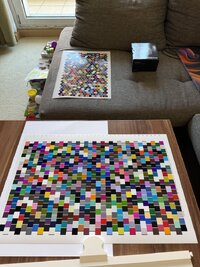
I made sure to give the targets enough time to dry and the reading process worked without much hassle. Only stripes AA and BM tended to be recognized as something else over and over again but after a few tries I accepted this and the profile turned out to be pretty fine. The sanity check showed only 5 patches with a higher DeltaE value than 2. So I followed your tipps on how to optimize the profile and read those patches (or the corresponding stripes) again. After copying the new values to the old ti3 file I created the profile again and now I am very happy with it.
I made some test prints and compared it with the profile that Epson delivers for the Epson Professional Semigloss paper and an ICC profile that Keith Cooper from Northligh images created for this combination (I assume he used X-Rite i1 Profiler and i1 Isis for his profile).
My new profile performed very similar in prints. There is not a huge difference (which is probably good since the other profiles were made by professionals). But I noticed that skin tones on the prints with my profile now lean very slightly more towards orange instead of magenta as they did with the other profiles. Again it is a very subtle difference but actually what I was hoping to achieve by creating my own profile.

My only issue was that v1.3.2 of the script would not run on my Mac because of an issue with access rights. So I used v1.2.5 which ran without an issue.

Best regards
itsab
 

Attachments

  • IMG_9318.jpeg
    IMG_9318.jpeg
    175.7 KB · Views: 1
  • ET8550_EpsPremSG_i1Studio_Mar26_sanity_check.txt
    147.1 KB · Views: 0

knowing

Getting Fingers Dirty
Joined
Oct 24, 2025
Messages
72
Reaction score
10
Points
30
Printer Model
HP CLJ5550, Brother MFC-9460
Update:

New version 1.3.3 released (see Argyll_Printer_Profiler), which includes new pre-mad charts created: Added several new targets, a few under Expert and Easy groups, but most under Intermediate. New chars are A2, A3, Ledger and Tabloid size. Portrait and landscape versions are made.

Cheers,
K
 
Top