


alx359
Getting Fingers Dirty
- Joined
- Aug 12, 2016
- Messages
- 14
- Reaction score
- 8
- Points
- 35
- Printer Model
- HP, Epson, Lexmark
Okay, was able to get the air out of the tubes in a few minutes, thanks to the method of @feedthisway on the first page. It works and it's quite straightforward! In his words:
I was able to make a couple photos of the process (have stained hands now lol). Really need a fat syringe because its head is quite different than the tiny ones:

The key part is to keep the head of the syringe tightly pressed to the tube nozzle. First push the head to open the vent of the tube nozzle and keep firmly to allow an air-tight coupling between both (use your belly as counterpoint )
)
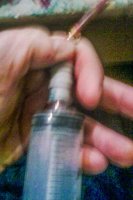
In such a position one could get all air out of a tube in a matter of seconds. Then clean the syringe from all trapped air and inject the remaining ink back into the tube. Easy!
By the way, I found I could get ink out of and into the CP cartridges using a fat syringe with the needle off - it was just right to depress the ball bearing and allow ink to pass - got to have a steady hand though! Also pretty hard to photograph, apologies admin!
I was able to make a couple photos of the process (have stained hands now lol). Really need a fat syringe because its head is quite different than the tiny ones:
The key part is to keep the head of the syringe tightly pressed to the tube nozzle. First push the head to open the vent of the tube nozzle and keep firmly to allow an air-tight coupling between both (use your belly as counterpoint
)In such a position one could get all air out of a tube in a matter of seconds. Then clean the syringe from all trapped air and inject the remaining ink back into the tube. Easy!
Last edited:


