pyToneRIP Black & White Printing without limits.

df11

Printing Apprentice
Joined
Oct 25, 2026
Messages
16
Reaction score
0
Points
13
Location
Berlin
Printer Model
З880,P800,R3000,P600,XP-960
Hello everyone,

I’d like to invite members of the community who are interested in digital black-and-white printing to test and take a look at my programme for printing black-and-white photos. It’s a new, advanced RIP for Epson printers, similar to QuadToneRIP but with extended support.

Key differences from QuadToneRIP:
1. The project is completely open-source, licensed under GPL 3.0
2. Print from any graphics programme, just like a standard driver. The programme is fully integrated into the Windows 11 printing system.
3. Support for a large number of printers not included in QTR.
4. Printing in both 8-bit and full 16-bit mode, just like QTR on macOS. Now we have this on Windows too :-)
5. International support in the GUI (27 languages)
6. Support for printing over Wi-Fi (WLAN) or LAN.
7. Advanced and sophisticated Dizerising techniques, in addition to the standard ‘Ordered’ method, as well as one in-house algorithm.
8. Support for modern photo resampling techniques.

Quad curve files are created in separate curve-creation programmes. My programme is primarily a driver and a RIP.
To create curves, use the modern and flexible MakeQuad programme by Hendrik Kuhlmann, or use ready-made curves from QuadToneRIP.
The programme documentation is not yet complete, but anyone already familiar with QuadToneRIP or MakeQuad who knows how to configure their printer should have no trouble getting to grips with it.
To start printing, simply fill in the two mandatory fields marked with a red asterisk. These are: selecting a printer and choosing a curve from 1 to 3. Your print job is now ready.
Documentation will follow later; at present, the programme is primarily intended for experienced users in the field of black-and-white digital printing.
The programme is currently under active development and has not yet reached a stable release, so it needs testers. The stability of the project depends on you.
Printers such as the ET-8550, ET... require testing.
The XP-750, XP-960, 3880, 7890 and 9890 work perfectly, as I own these printers myself.

Link to the project:
https://github.com/dfoxelf/pyToneRIP
 

Attachments

  • 2026-10-25_18-28.png
    2026-10-25_18-28.png
    111.4 KB · Views: 47
Last edited:
New prelease Version 244

I have released a new version. Please always uninstall the old version first before installing the new one, to ensure that any remnants of the old programme do not affect the operation of the new version.
Many changes have been made regarding the SureColor PXXXX wide-format printers.
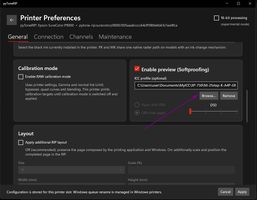
A colour proof preview has also been added. Simply attach your ICC profile, which is created using the QTR-Create-ICC-RGB.exe utility. I’ll be writing my own, improved version soon.
If no profile is available, the programme displays an average value based on the selected paper type. Around 1,000 values were analysed, and the average L value and fluorescence value were selected (if the paper contains OBAs); I'm also use the Bradford method to calculate the colour adaptation of the preview to the selected lighting conditions: D50, D55, D60 or D65.
This gives an approximate idea of what your printouts will look like.
If you don’t mind, and should there be any errors, there is a button in the main programme window to generate a report on your desktop in ZIP format. Could you please attach your feedback to the form? This will allow me to correct errors promptly, and you will be directly involved in the further development of the project. No personal data is uploaded.
Thank you for your interest in the programme.

P.S.
I also forgot to mention another difference from QuadToneRIP right at the start: pyToneRIP supports several types of paper that the printer supports. What does this mean? Each printer has a specific list of paper types associated with it, each with unique firmware codes, which can actually be used to change the printer’s print mode at the firmware level. QuadToneRIP has only two: Matte and Glossy, whilst, for example, the 3880 or 7890 printers support more paper types and, consequently, different print settings at the firmware level rather than at the ICC profile level. In other words, each paper code instructs the printer to use a specific, unique print mode embedded in the firmware by Epson for that particular printer and paper type.

https://github.com/dfoxelf/pyToneRIP/

Best Regards,
Alexander
 

Attachments

  • 2026-10-31_16-21.png
    2026-10-31_16-21.png
    76.3 KB · Views: 10
  • 2026-10-31_16-19.png
    2026-10-31_16-19.png
    179.2 KB · Views: 10
Hi Alexander,

I just had a short look on your program. Installation went smooth. Printer setup was also quite easy. My network connected SC-P600 was recognized. I only wanted to do some quick prints, but there were no samples curves to select. So I had to use some quads from QTR. The printouts with these were quite ok. But how can one print, if they don't have already curves? How to create these?

Regards,

Ronald
--
 
Hi Alexander,

I just had a short look on your program. Installation went smooth. Printer setup was also quite easy. My network connected SC-P600 was recognized. I only wanted to do some quick prints, but there were no samples curves to select. So I had to use some quads from QTR. The printouts with these were quite ok. But how can one print, if they don't have already curves? How to create these?

Regards,

Ronald
--
I’m really pleased that you quickly got to grips with it – well done!
That’s a very good and pertinent question.
Yes, pyToneRIP is a driver that interprets curves into a format the printer can understand. I deliberately chose not to create a tool for drawing curves, as that’s a completely different task and there are already several good tools available for that purpose.
1. This is the classic utility from QTR CurveCreation. There’s documentation available, and you should also have a look at Paul Roark’s work.
2. MakeQuad by Hendrik Kuhlmann. There is very detailed documentation, and Thilo has provided a step-by-step guide on curve creation.
3. quadGEN Beta 5.1.0 by David Marsh https://quadgen.ink/
4. And for macOS, there’s a paid tool: https://www.bwmastery.com/quadtoneprofiler-pro

P.S.
It would be brilliant if you could share your process for creating curves. It would be a huge help to beginners and less experienced users.

Best Regards,
Alexander
 
Last edited:
Yes, pyToneRIP is a driver that interprets curves into a format the printer can understand. I deliberately chose not to create a tool for drawing curves, as that’s a completely different task and there are already several good tools available for that purpose.
For me, that's not a problem as I already have the tools to create quad files, but it could be worth a note in the README.md to inform other interested people about that fact. Perhaps also provide same generic sample curves in a supplementary archiv (.zip, .7z or so).
 
For me, that's not a problem as I already have the tools to create quad files, but it could be worth a note in the README.md to inform other interested people about that fact. Perhaps also provide same generic sample curves in a supplementary archiv (.zip, .7z or so).
That’s a brilliant idea! ! I’m thinking along the same lines too.
How do you create the curves, though?
Yes, I definitely need to work on the documentation. And include the main curves, at least for basic printers, so that users can start printing straight away and see the results – even if they’re not quite optimal.
To help the project grow, I want to set up a sort of community where every member can upload their own curves for their printers and talk about them.
I’m just thinking about how best to organise this. It’s unlikely anyone would sign up to GitHub just to upload a curve to their printer’s subfolder. Another website? That doesn’t seem very viable either.
I don’t want to be the only one working on curves; I don’t have the resources that others do. A community of curve enthusiasts seems like a good idea to me.
What do you think?;)
 
Last edited:
How do you create the curves, though?
As a registered QTR user I use the CurveCreation Tool (Not an option if one hasn't payed the shareware fee) and QuadToneProfile (Also a bought program). Free available are MakeQUAD (looks like "strong stuff" with a steep learning curve) and lastly quadGEN. It runs directly in a browser online or - quite easily - locally installed. This one would be my first pick, if I don't have QTR or QuadToneProfiler in my line-up.

To help the project grow, I want to set up a sort of community where every member can upload their own curves for their printers and talk about them.
I’m just thinking about how best to organise this. It’s unlikely anyone would sign up to GitHub just to upload a curve to their printer’s subfolder. Another website? That doesn’t seem very viable either.
I don’t want to be the only one working on curves; I don’t have the resources that others do. A community of curve enthusiasts seems like a good idea to me.
Would be nice, but I'm afraid for a niche mean enthusiast product, not a really realistic approach. Most people are printing b&w images in color mode - not even using their printers ABW mode. Only a few are going this way. How many different papers are on the market? I'm using regularly 3 - to 5 max. Must be very lucky to find a profile/curve for these. I simply can't imagine that a community could be called into life. If someone is willing to share the curves, sending a mail with them would do fine for the start. No big deal, no really work to integrate them into the curve sample area of the Github project or a website.
 
Back
Top