profiling with Epson Print Layout

Lothman

Fan of Printing
Joined
Sep 4, 2010
Messages
84
Reaction score
33
Points
53
Hi all,
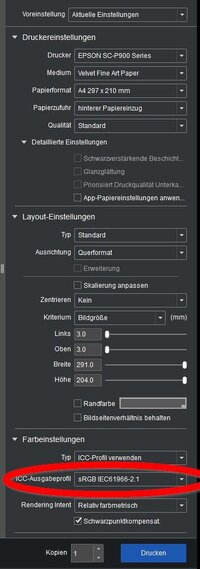
what settings in the Epson Print Layout software should I use in order to print a target for profiling?
I did not find the possibility to switch off color management in the Epson Print Layout software.

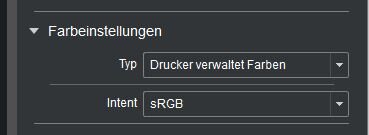
May be you can have please a look at those two screenshots whether this would be a way to go?
 

Attachments

  • epson_print_layout.jpg
    epson_print_layout.jpg
    63.4 KB · Views: 354
  • epson_b.jpg
    epson_b.jpg
    8.6 KB · Views: 311
I'm using Qimage for most print jobs and didn't even know that this Print Layout software is installed on my computer.
 
I know there is other software and how to do it with other software, but for certain reasons I have to stick to Epson Print Layout program. So can anybody give me a hint what to select in the Epson Print Layout software?

Edit: If I tell the printer to use SRGB as icc-profile, should this do the trick?
 
Last edited:
As long as you let the printer administer the colors you should use the printer driver to make the settings there - specifically 'No color adjustments' via the extended color adjustment settings. And you need to use the same driver settings when you use that profile which you have created and which you then call up in the Epson software - I would not see another way - but a test should confirm if that's the way to go.
 
Last edited:
Hello Nelson,
this confirms my suspicion, if I print a AdobeRGB file with AdobeRGB in the ICC-profile selection of Epson Print Layout, then this should emulate the same like colormangement "off".

Unfortunately in the Epson Print Layout software you have no longer access to the "normal" printer driver in order to choose settings. So using such a trick might be an easy work around. Thanks for the link :frow

Is there way to check whether this trick works? Can I see or measure on a print that I have printed it with colormangement off?
 
I think you are almost there: if you are using photoshop, you should first assign the working rgb-profile to the file, in your case it is probably srgb1988-2 (maybe it is already included) and print with icc-profile srgb1988-2 in Epson print layout software, choosing relative colorimetric and black point compensation to NONE/DISABLE.
 
Today I had a chat with an Epson-Technician. Epson Print layout ALWAYS transforms the colors, it can NOT be used to print icc-targets. The null transformation with selecting SRGB as output-profile does not work. I was recommended to use Adobe Color Print Utility instead.
 
Today I had a chat with an Epson-Technician. Epson Print layout ALWAYS transforms the colors, it can NOT be used to print icc-targets. The null transformation with selecting SRGB as output-profile does not work. I was recommended to use Adobe Color Print Utility instead.
That's a good choice if you are on a Windows system.
Adobe Color Print Utility on a Mac is not supported with OS Catalina or later which was about five years ago.
What can be used on todays Mac Computers is their built in ColorSync utility which as a specific Print Target option when printing (you also have to have the printer set correctly too)

John Wheeler
 
That's a good choice if you are on a Windows system.
Adobe Color Print Utility on a Mac is not supported with OS Catalina or later which was about five years ago.
What can be used on todays Mac Computers is their built in ColorSync utility which as a specific Print Target option when printing (you also have to have the printer set correctly too)

John Wheeler
Maybe it is not supported officially but it works, i create several profiles on my Monterey Mac without any issues using Adobe Color Print Utility.

I can confirm that Epson Print Layout can't be used to print Target Profiles, i already tried in the past.
 
Back
Top