Pro-100 - No power to the printhead after bonehead move on my part

samboy

Getting Fingers Dirty
Joined
Feb 19, 2025
Messages
30
Reaction score
1
Points
23
Printer Model
Canon PIXMA Pro-100
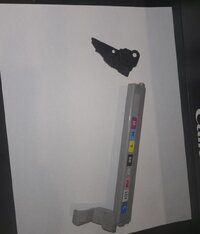
So, my Pro-100 is giving me the 4 flash error. I purchased it over a year ago second hand. It arrived with part of the print head holder broken off. It was a small piece on the top right of the mechanism where the gray bar inserts on the right side into that circle hole. Anyway, I successfully placed the broken piece into place and it's been working fine until this weekend. When it broke again, I decided to glue it, and I was holding it in place by wedging two Q-tips into a void on the right side of the print head holder that moves back and forth when you print. (The attached image is me attempting to recreate what caused the error after the fact, and without the piece that I glued back on) The next time I tried it, I forgot to remove the Q-tips, and it proceeded to bang the side with the q-tips on the right side where it goes to rest. Since then, it is still giving me 4-flashes, but it's like there has been no power to the entire print head contraption. The q-tios were up against 4 blue wires so I'm not sure if one of those got loose (they don't feel loose). Regardless, the print head no longer lights up any of the tanks and has yet to make any left or right movements. Can you guys help me figure out what's wrong? I've only had her like 1-year now and it's way too soon to pull the plug on her. Thank youl
 

samboy

Getting Fingers Dirty
Joined
Feb 19, 2025
Messages
30
Reaction score
1
Points
23
Printer Model
Canon PIXMA Pro-100
Thanks Hat. It's just the yellow light flashing 4 times. Also, here are some additional pics. I took of the piece that I glued to make sure it wasn't pinching one of the blue cables. The purple arrow is around the spot where the q-tip must have hit.
1000039065.jpg
 

Attachments

  • 20260615_162816.jpg
    20260615_162816.jpg
    50.8 KB · Views: 9

PeterBJ

Printer VIP
Platinum Printer Member
Joined
Nov 27, 2010
Messages
5,277
Reaction score
5,184
Points
373
Location
Copenhagen Denmark
Printer Model
Canon MP990
Could the "four flash error" mean the error LED flashes four times or maybe the error LED and the power LED flashes alternately four times?

This could mean something blocks the free movement of the printhead carriage or a problem with the purge unit.

Here is a list of Canon error messages from druckerchannel.de. You can use google translate or other translator if you don't read German.

Here is a clip translated to English:

Pro 100 4 flashes en.jpg


"The ink cartridge is not used correctly" is not a good translation of the German "Die Tintenpatrone ist nicht korrekt eingesetz" A better translation would be "The ink cartridge is not properly installed." Here is the German list for four flashes:

Pro 100 4 flashes de.jpg
 
Last edited:

samboy

Getting Fingers Dirty
Joined
Feb 19, 2025
Messages
30
Reaction score
1
Points
23
Printer Model
Canon PIXMA Pro-100
Yes, they alternate for a 4 flash cycle. The carriage never moves any from side to side, but it goes slightly up and down briefly on startup. Is there anyway to inspect underneath the carriage? I don't feel any resistance when I push it from side to side.
 

The Hat

Printer VIP
Platinum Printer Member
Joined
Jan 18, 2010
Messages
16,226
Reaction score
9,154
Points
453
Location
Residing in Wicklow Ireland
Printer Model
Now have 3 Ender-3 V3 Plus SE/
I don't feel any resistance when I push it from side to side.
If you can move the print head back and forth, then I suspect the wiper blade system is most lightly jammed down and can’t move at all..

Move the print head to the far left side and then rotate the white geared wheel around, (Below the purple arrow) if you feel resistance then you’ll need to free up the wiper blade arm manually..
 
Top