


John Wallace
Print Addict
- Joined
- Sep 10, 2015
- Messages
- 123
- Reaction score
- 73
- Points
- 170
- Location
- Valencia, Spain
- Printer Model
- Canon Pixma iP7250 and MG5350,
There seems to be a problem with this, which recent upgrades to Tahoe have not solved. If you se t your printer settings in Printer Sharing, when you wake from sleep they are not there. I thought this workaround might be useful, if you have this problem.
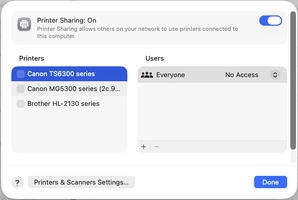
I have three printers running off my Mac mini and my wife's Mac mini: Canon MG33500, TS6300, and Brother HL 2130, all running via USB and Bonjour shared. This is what I get on System settings - General - Sharing - Printer sharing - Ⓘ:

I reset them to this:

If at this point I simply close system settings, I lose those settings. Instead I click on the amber button at the top left of the traffic light buttons and send System Settings to the bottom Dock menu, where they remain 'open'. When I click back on the systems settings icon in the dock, they return to the screen with the Printer settings intact.
This works after sleep but not after restart or shut down.
Hope that helps those of you who have this unresolved problem with some of us in Tahoe.
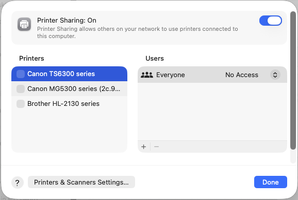
I have three printers running off my Mac mini and my wife's Mac mini: Canon MG33500, TS6300, and Brother HL 2130, all running via USB and Bonjour shared. This is what I get on System settings - General - Sharing - Printer sharing - Ⓘ:
I reset them to this:
If at this point I simply close system settings, I lose those settings. Instead I click on the amber button at the top left of the traffic light buttons and send System Settings to the bottom Dock menu, where they remain 'open'. When I click back on the systems settings icon in the dock, they return to the screen with the Printer settings intact.
This works after sleep but not after restart or shut down.
Hope that helps those of you who have this unresolved problem with some of us in Tahoe.
Attachments
Last edited:


