Et-7750

Venessa

Print Lurker
Joined
Jan 14, 2026
Messages
1
Reaction score
0
Points
1
Printer Model
Epson ET-7550
Hi , not sure if anyone can help me, but is it possible to change the the borderless ink pad myself and reset it the Epson et-7750 without sending it off to Epson? Who are presently charging nearly £400 now.
 

Epatcola

Printer Guru
Joined
Mar 21, 2020
Messages
119
Reaction score
68
Points
110
Printer Model
various
Printing borderless is generally considered to be a bad idea and gave you this problem.

There is a WIC reset utility which claims to support the ET-7750. It requires you to purchase a US$ 10 key to use it (possibly a free trial key can be used to set the pads to 80% full). Personally I would be dubious about using it and even if it does work you would have the considerable hassle of finding or making replacement pads and installing them.

I presume it is just inhibiting further borderless printing. I would get a cutter and bigger paper :)
 

PeterBJ

Printer VIP
Platinum Printer Member
Joined
Nov 27, 2010
Messages
5,228
Reaction score
5,127
Points
373
Location
Copenhagen Denmark
Printer Model
Canon MP990
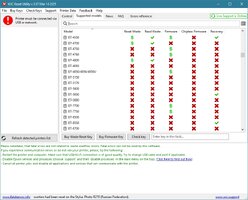
I think the WIC reset will be of no use here. It looks like it only can change the firmware version, see this screen shot, click to enlarge:

Wic reset.jpg
 

Ink stained Fingers

Printer VIP
Platinum Printer Member
Joined
Dec 27, 2014
Messages
6,346
Reaction score
7,562
Points
373
Location
Germany
Printer Model
L805, WF2010, ET8550, T3100X
I think the WIC reset will be of no use here.
Yes - since the ET-7750 comes with a user replaceable waste ink bin, and a new waste ink box comes with a new chip. That's the same with the ET-8550 not giving access to the waste ink status via WICReset. You should have access to the waste ink status via the printer screen menu - the maintenance tab
 
Top