Wendy K
Newbie to Printing
- Joined
- Nov 30, 2025
- Messages
- 1
- Reaction score
- 0
- Points
- 3
- Printer Model
- Epson SC P700
Hi all,
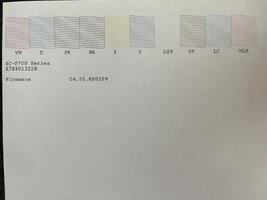
I have run the head cleaning 3 times today in an attempt to print a photo. Before I ran it I replaced 4 ink cartridges with Epson catridges, (one of them was Cyan, the one I am having problems with) After 3 attempts my report looks like the attached. The Cyan color is not printing anything - completely blank. Does anyone have any suggestions? could the brand new cartridge be bad? or something else wrong in the printer itself? I will be grateful for any ideas.
Thanks Wendy

I have run the head cleaning 3 times today in an attempt to print a photo. Before I ran it I replaced 4 ink cartridges with Epson catridges, (one of them was Cyan, the one I am having problems with) After 3 attempts my report looks like the attached. The Cyan color is not printing anything - completely blank. Does anyone have any suggestions? could the brand new cartridge be bad? or something else wrong in the printer itself? I will be grateful for any ideas.
Thanks Wendy