
AmaDeuSbg
Getting Fingers Dirty
- Joined
- Aug 15, 2023
- Messages
- 41
- Reaction score
- 16
- Points
- 33
- Printer Model
- L1300,L850,L1800, Canon TM-255
Hello,
This community has proven really helpful and caring in the past and I hope that you can shed some light on that issue because it is driving me crazy.
A little history. The printer is used with sublimation inks for like 6 years now but it is relatively low page count - 5700 copies - I use Inktec sublimation inks for like 3 years now because they have proven that they are less trouble and produce great colors. I make my profiles etc.
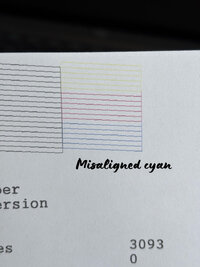
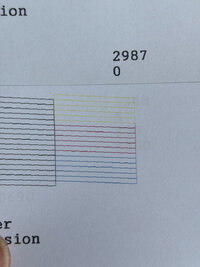
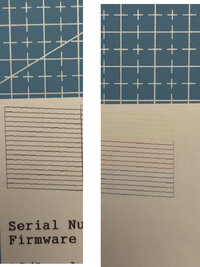
From time to time (through the last maybe 2 years) occasionally I lose some nozzles or after a head strike and cleaning and a channel (usually it was black or the cyan) disappears. After some cleanings etc everything comes back to normal. However, a bizarre misalignment on one specific cyan nozzle occurred I think for a second time (last time it fixed itself alone if I recon correctly) but now it is so stubborn and is still there. Also, there is a mist on several black nozzles and some cyan ones that occur on the nozzle check, which previously resulted in banding also. The nozzle check "shadow/mist" is better when I turn on the printer and make a nozzle check and gets worse if I make a nozzle check after printing. Then if printer is idle or I turn it on the next day , first nozzle check for the day is also better.
I tried slightly lubricating the rail (at both ends there was some dust mixed with some oil, cleaned that, also put a tiny drop of sewing machine oil on a lint free cloth and went through the rail). I wonder if it was not enough because I still felt some resistance moving the carriage at its end points (but some people mentioned it might be just the belt resistance because they are end points). Another strange thing is that when printing, when the head changes positions at the closest to the capping station point, there is some slight metal noise (like resonance from the head shield) which however is much better after I lubricated and even stops after the 1st A3 page or the 2nd one. People mentioned it could be that the rail is cold and lubrication can be enough and still does that and it was nothing fatal but decided to consult with the experts here also.
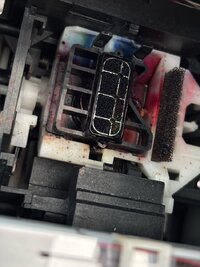
About 5 days ago I noticed that there was a lot of ink buildup at the lowest left outer corner of the rubber seal of the capping station. I cleaned that, I am not sure if that also helped with the noise which the printhead produces at the end point when printing. (or even has anything to do with the banding)
I linked the waste line to an external tank, which was clogged and returned ink to the head (made vacuum) but this was months ago (maybe even half an year at least) and before that I also had some ghosting on the nozzle check lines (which by the way back then in 2023 august improved but did not disappear with changing the inks with fresh ones and the damper with a new one). I wonder if it is ink starvation or something because basically my other L1800 sometimes experienced such things but nothing like mist on the nozzle or the strongly misaligned cyan one. Back then in 2023 I changed the damper and it helped reduce the nozzle ghosting after the normal lines so now I again changed the damper but things do not improve a lot (or at all).
Could the head be damaged? I recon such thing slightly fixed itself ( I am not sure if back then I printed cyan only sheets or eventually fed some cleaning fluid on the printhead nozzle inlet with a cyringe in the past). I can't stop but wonder if it is something related to my printing habits or something else. Usually I print a nozzle check when I start the printer just to check things out then start printing. I keep all nozzles operational and when I see a clogged one I run a cleaning.
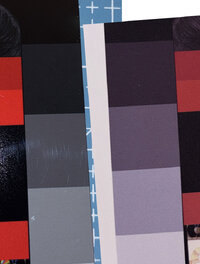
I know humidity is a factor and decided to buy a humidifier - also not an issue because humidity is like 52%. I am at 9th floor but I doubt this is the reason? It is also winter here so about 20 degrees inside the room. Maybe irrelevant things, but I am just throwing some info incase it is related. It is really driving me crazy to the point that I started to wonder if to buy a new printer (although the banding is not so bad but I prefer to make quality stuff and although most of it disappears when transferred, it still annoys me).
In summary:
1) Cleaned the rail. Lubricated slightly (I wonder if it is enough at the start and at the end of the rail because there movement seems a little more difficult to me (or I might imagine it, do not know).
2) Cleaned rubber seal of the capping station
3) Changed cyan damper
4) Filled the inks back to 80% in the tanks because cyan was on like 15.
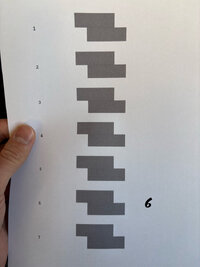
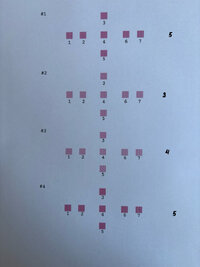
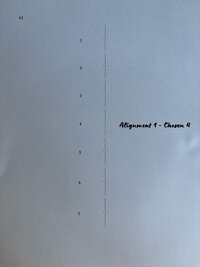
5) Tried head alignment and it improved the situation to the point that there are no white lines (banding) or at less less of them but a slight overlapping ones (which annoys me also). But my guess is this is due to the misaligned cyan? i upload the choices I made during alignment, do you thing additional alignment is needed?
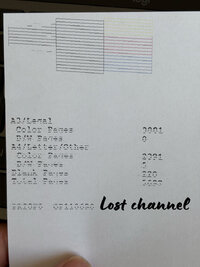
I upload a photo when a channel is lost (last time happened after the holidays, printer was not used for just 3 days). This rarely happens because I use it daily and had no issues and I found it strange it did happen after such a short period but that could not be the main reason, of course. The misaligned nozzle I think got really close to being OK when it rested for more than 1 day but after printing things get back to equal with the next one.
All that is made about 4 days ago and I printed like 5-6 pages A3 since then but I presume if those were the problems things should have improved by now?
I am grateful to all of you that will find the time to read that and will hopefully help me unwrap that.
Happy new year and have a great and a successful one filled with wonderful moments both with your printers and families.
Best Wishes
This community has proven really helpful and caring in the past and I hope that you can shed some light on that issue because it is driving me crazy.
A little history. The printer is used with sublimation inks for like 6 years now but it is relatively low page count - 5700 copies - I use Inktec sublimation inks for like 3 years now because they have proven that they are less trouble and produce great colors. I make my profiles etc.
From time to time (through the last maybe 2 years) occasionally I lose some nozzles or after a head strike and cleaning and a channel (usually it was black or the cyan) disappears. After some cleanings etc everything comes back to normal. However, a bizarre misalignment on one specific cyan nozzle occurred I think for a second time (last time it fixed itself alone if I recon correctly) but now it is so stubborn and is still there. Also, there is a mist on several black nozzles and some cyan ones that occur on the nozzle check, which previously resulted in banding also. The nozzle check "shadow/mist" is better when I turn on the printer and make a nozzle check and gets worse if I make a nozzle check after printing. Then if printer is idle or I turn it on the next day , first nozzle check for the day is also better.
I tried slightly lubricating the rail (at both ends there was some dust mixed with some oil, cleaned that, also put a tiny drop of sewing machine oil on a lint free cloth and went through the rail). I wonder if it was not enough because I still felt some resistance moving the carriage at its end points (but some people mentioned it might be just the belt resistance because they are end points). Another strange thing is that when printing, when the head changes positions at the closest to the capping station point, there is some slight metal noise (like resonance from the head shield) which however is much better after I lubricated and even stops after the 1st A3 page or the 2nd one. People mentioned it could be that the rail is cold and lubrication can be enough and still does that and it was nothing fatal but decided to consult with the experts here also.
About 5 days ago I noticed that there was a lot of ink buildup at the lowest left outer corner of the rubber seal of the capping station. I cleaned that, I am not sure if that also helped with the noise which the printhead produces at the end point when printing. (or even has anything to do with the banding)
I linked the waste line to an external tank, which was clogged and returned ink to the head (made vacuum) but this was months ago (maybe even half an year at least) and before that I also had some ghosting on the nozzle check lines (which by the way back then in 2023 august improved but did not disappear with changing the inks with fresh ones and the damper with a new one). I wonder if it is ink starvation or something because basically my other L1800 sometimes experienced such things but nothing like mist on the nozzle or the strongly misaligned cyan one. Back then in 2023 I changed the damper and it helped reduce the nozzle ghosting after the normal lines so now I again changed the damper but things do not improve a lot (or at all).
Could the head be damaged? I recon such thing slightly fixed itself ( I am not sure if back then I printed cyan only sheets or eventually fed some cleaning fluid on the printhead nozzle inlet with a cyringe in the past). I can't stop but wonder if it is something related to my printing habits or something else. Usually I print a nozzle check when I start the printer just to check things out then start printing. I keep all nozzles operational and when I see a clogged one I run a cleaning.
I know humidity is a factor and decided to buy a humidifier - also not an issue because humidity is like 52%. I am at 9th floor but I doubt this is the reason? It is also winter here so about 20 degrees inside the room. Maybe irrelevant things, but I am just throwing some info incase it is related. It is really driving me crazy to the point that I started to wonder if to buy a new printer (although the banding is not so bad but I prefer to make quality stuff and although most of it disappears when transferred, it still annoys me).
In summary:
1) Cleaned the rail. Lubricated slightly (I wonder if it is enough at the start and at the end of the rail because there movement seems a little more difficult to me (or I might imagine it, do not know).
2) Cleaned rubber seal of the capping station
3) Changed cyan damper
4) Filled the inks back to 80% in the tanks because cyan was on like 15.
5) Tried head alignment and it improved the situation to the point that there are no white lines (banding) or at less less of them but a slight overlapping ones (which annoys me also). But my guess is this is due to the misaligned cyan? i upload the choices I made during alignment, do you thing additional alignment is needed?
I upload a photo when a channel is lost (last time happened after the holidays, printer was not used for just 3 days). This rarely happens because I use it daily and had no issues and I found it strange it did happen after such a short period but that could not be the main reason, of course. The misaligned nozzle I think got really close to being OK when it rested for more than 1 day but after printing things get back to equal with the next one.
All that is made about 4 days ago and I printed like 5-6 pages A3 since then but I presume if those were the problems things should have improved by now?
I am grateful to all of you that will find the time to read that and will hopefully help me unwrap that.
Happy new year and have a great and a successful one filled with wonderful moments both with your printers and families.
Best Wishes
Attachments
-
 1.jpeg103.8 KB · Views: 92
 -
 Alignment 1.jpeg70 KB · Views: 70
 -
 Alignment 2.jpeg62.1 KB · Views: 66
 -
 Alignment 3.jpeg62.5 KB · Views: 67
 -
 better days.JPG122.8 KB · Views: 64
 -
 Ghostly lines over the nozzle check lines.jpg109.3 KB · Views: 75
 -
 Left capping corner.jpeg119.3 KB · Views: 74
 -
 Paper and transfer.jpg109.8 KB · Views: 74
 -
 Sometimes when a channel is lost.jpeg109.9 KB · Views: 83
