tricey
Print Lurker
- Joined
- Jan 13, 2026
- Messages
- 2
- Reaction score
- 0
- Points
- 1
- Printer Model
- Epson 3880, Canon PIXMA iX6820
I’m hoping someone here might have some insight because this has been driving me a little nuts.
I’m on a Windows 10 PC using a ColorMunki Photo with ccStudio. I originally used the old ColorMunki Photo software and had great results. When ccStudio came out, I upgraded and everything worked perfectly, so I switched fully to ccStudio for making my custom ICC profiles.
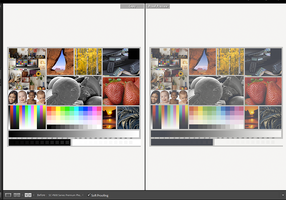
About a year (or less) into using ccStudio, something changed out of nowhere. New profiles made with ccStudio started looking bad, and even older profiles I had already made with ccStudio stopped producing the same quality they used to. My blacks especially started looking muddy and weak.
I print with a Canon Pixma iX6820 and an Epson 3880. Because of this issue, I ended up remaking a lot of profiles using the original ColorMunki Photo software, and as of today, that’s the only software that gives me usable ICC profiles.
What’s confusing is that I didn’t change my workflow. I double-check all print settings and have them saved per paper type so I don’t accidentally mess something up. I print from Photoshop and make sure the correct settings are selected. When saving profiles, I always create both V2 and V4 versions and label them clearly. When I make profiles with the ColorMunki Photo software, I also add “CM” to the profile name so I know exactly where it came from.
I recently noticed that Calibrite has Profiler 3.0 now. I don’t mind paying to upgrade, but I’m honestly worried I’ll run into the same issue I had with ccStudio. I really miss ccStudio because I liked being able to save my workflow and come back to it after letting prints dry overnight.
For now, I’m sticking with the original ColorMunki Photo software and plan to try PrintPrism once my supported scanner arrives. Is Profiler 3.0 worth the upgrade, or am I likely to run into the same issues?
Has anyone experienced a sudden change like this before? Any idea what could cause profiles to just stop working properly? Also—should I finally give in and upgrade to Windows 11? I’ve been declining it, but I do keep Windows 10 fully up to date.
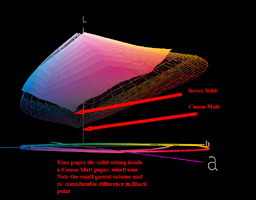
I’ve uploaded recent V2 and V4 ICC profiles I made for my Canon Pixma iX6820 on an uncoated Xerox Bold paper that I need for a current project, in case anyone wants to take a look.
Thanks in advance—I really appreciate any thoughts or ideas.
I’m on a Windows 10 PC using a ColorMunki Photo with ccStudio. I originally used the old ColorMunki Photo software and had great results. When ccStudio came out, I upgraded and everything worked perfectly, so I switched fully to ccStudio for making my custom ICC profiles.
About a year (or less) into using ccStudio, something changed out of nowhere. New profiles made with ccStudio started looking bad, and even older profiles I had already made with ccStudio stopped producing the same quality they used to. My blacks especially started looking muddy and weak.
I print with a Canon Pixma iX6820 and an Epson 3880. Because of this issue, I ended up remaking a lot of profiles using the original ColorMunki Photo software, and as of today, that’s the only software that gives me usable ICC profiles.
What’s confusing is that I didn’t change my workflow. I double-check all print settings and have them saved per paper type so I don’t accidentally mess something up. I print from Photoshop and make sure the correct settings are selected. When saving profiles, I always create both V2 and V4 versions and label them clearly. When I make profiles with the ColorMunki Photo software, I also add “CM” to the profile name so I know exactly where it came from.
I recently noticed that Calibrite has Profiler 3.0 now. I don’t mind paying to upgrade, but I’m honestly worried I’ll run into the same issue I had with ccStudio. I really miss ccStudio because I liked being able to save my workflow and come back to it after letting prints dry overnight.
For now, I’m sticking with the original ColorMunki Photo software and plan to try PrintPrism once my supported scanner arrives. Is Profiler 3.0 worth the upgrade, or am I likely to run into the same issues?
Has anyone experienced a sudden change like this before? Any idea what could cause profiles to just stop working properly? Also—should I finally give in and upgrade to Windows 11? I’ve been declining it, but I do keep Windows 10 fully up to date.
I’ve uploaded recent V2 and V4 ICC profiles I made for my Canon Pixma iX6820 on an uncoated Xerox Bold paper that I need for a current project, in case anyone wants to take a look.
Thanks in advance—I really appreciate any thoughts or ideas.