esozial
Newbie to Printing
- Joined
- Nov 25, 2025
- Messages
- 2
- Reaction score
- 0
- Points
- 8
- Printer Model
- Canon Pixma Pro 9500 MK2
Hello! 
I've been having a problem with my Pro 1000 since yesterday.
First of all, three days ago everything worked perfectly with A4 and A3 paper.
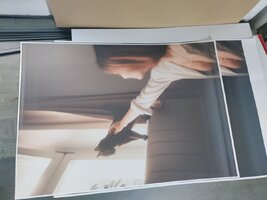
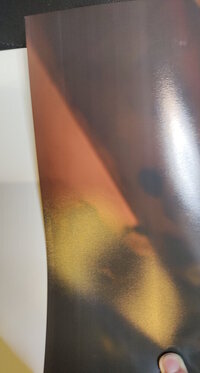
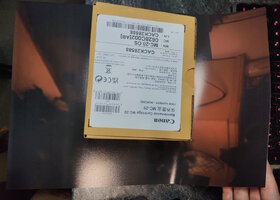
Yesterday, it started having problems with the very first A2 sheets, consistently failing to print the dark areas in the same section (relatively near the bottom, in the last 20%).
At first, I attributed this to the paper and ICC profiles, but I left it for now due to cost.
... Today I printed an A3 sheet of paper – the same thing happened...
I couldn't improve it with different settings, paper, and ICC profiles. Only the "Print Quality" setting had any effect. The lower the quality, the "fewer" problems I have – but never completely problem-free.
I've tried different paper (Hahnemuehle Photolustre and Brilliant Lustre Ultimate), and I've also used new MBK-PBK-PGY-GY ink, including a small printhead cleaning.
I already removed the printhead yesterday and cleaned the outside of any deposits.
I've also tried various programs, without success. Lightroom CC, Windows built-in inkjet, and My Image Garden – all without success.
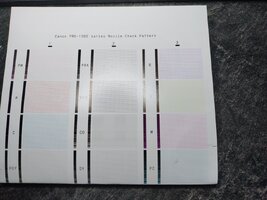
For a short time, CO and PBK were problematic, but this was resolved after another small printhead cleaning.
The only thing that really bothers me is that it doesn't happen with "Matt" and matte paper. Even when I print with the Lustre settings but use matte paper.
Do you have any ideas?
A rough summary of measures already taken:
-Printhead cleaning (small)
-Printhead removal to eliminate external ridges
-Printhead alignment
-Various ICC profiles
-Various paper type settings (Windows & printer)
-Various paper types (5 different grades, Hahnemühle, Brilliant, Photolux, etc.)
-PGY, GY, MBK, PBK replaced
-CO refilled (previously ~35% remaining)
I've been having a problem with my Pro 1000 since yesterday.
First of all, three days ago everything worked perfectly with A4 and A3 paper.
Yesterday, it started having problems with the very first A2 sheets, consistently failing to print the dark areas in the same section (relatively near the bottom, in the last 20%).
At first, I attributed this to the paper and ICC profiles, but I left it for now due to cost.
... Today I printed an A3 sheet of paper – the same thing happened...
I couldn't improve it with different settings, paper, and ICC profiles. Only the "Print Quality" setting had any effect. The lower the quality, the "fewer" problems I have – but never completely problem-free.
I've tried different paper (Hahnemuehle Photolustre and Brilliant Lustre Ultimate), and I've also used new MBK-PBK-PGY-GY ink, including a small printhead cleaning.
I already removed the printhead yesterday and cleaned the outside of any deposits.
I've also tried various programs, without success. Lightroom CC, Windows built-in inkjet, and My Image Garden – all without success.
For a short time, CO and PBK were problematic, but this was resolved after another small printhead cleaning.
The only thing that really bothers me is that it doesn't happen with "Matt" and matte paper. Even when I print with the Lustre settings but use matte paper.
Do you have any ideas?
A rough summary of measures already taken:
-Printhead cleaning (small)
-Printhead removal to eliminate external ridges
-Printhead alignment
-Various ICC profiles
-Various paper type settings (Windows & printer)
-Various paper types (5 different grades, Hahnemühle, Brilliant, Photolux, etc.)
-PGY, GY, MBK, PBK replaced
-CO refilled (previously ~35% remaining)