Canon Pixma Pro100 stopped printing

annawong

Newbie to Printing
Joined
May 13, 2026
Messages
3
Reaction score
1
Points
3
Printer Model
Canon Pixma Pro 100
Hello,
My Pro-100 is not printing. The yellow light flashes three times. I’ve checked every possible cause for this error but found nothing wrong—no paper jams or other issues. When I send a file to print, the printer feeds about an inch of paper, then stops and the yellow light flashes three times.

This is a new issue; the printer worked perfectly until now. I’ve tried turning it off and on several times. I’ve never experienced a print with a missing portion of paper before. After restarting, the yellow light is not blinking, but it starts blinking again when I try to print, and it won’t stop. At one point, it successfully printed a 4x6 photo, but nothing has printed correctly since.

Any assistance would be greatly appreciated.
 

The Hat

Printer VIP
Platinum Printer Member
Joined
Jan 18, 2010
Messages
16,211
Reaction score
9,147
Points
453
Location
Residing in Wicklow Ireland
Printer Model
Now have 3 Ender-3 V3 Plus SE/
Any assistance would be greatly appreciated.
The LED blinking 3 times is put down as a paper jam somewhere in your printer, yes I know there’s no paper jam, but your printer reckons there is, so try feeding a sheet of paper through the printer by hand..

The only other thing that would cause that error is a sheet that was pulled backwards, damaging or bending a sensor on the paper path..
 

PeterBJ

Printer VIP
Platinum Printer Member
Joined
Nov 27, 2010
Messages
5,273
Reaction score
5,182
Points
373
Location
Copenhagen Denmark
Printer Model
Canon MP990
There might be another cause of the error, a defective sensor for the CD print door. I think "front flap" means CD print door. This sensor might be a microswitch that can be taken apart and cleaned. See this.

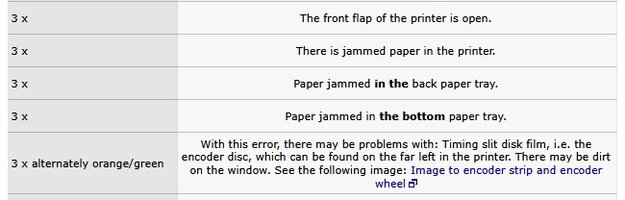
Here is a clip from Druckerchannel's list of Canon errors, translated to English.

Canon error codes 3x.jpg

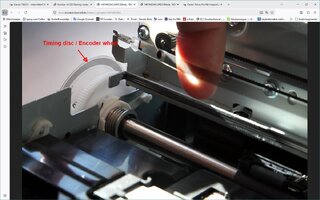
In case of the alternating orange/green or yellow/white or yellow blue alternating flashes it could be a problem with a dirty encoder or timing strip or wheel, see this, click to enlarge:

Canon error 3x timing.jpg
 
Last edited:

PeterBJ

Printer VIP
Platinum Printer Member
Joined
Nov 27, 2010
Messages
5,273
Reaction score
5,182
Points
373
Location
Copenhagen Denmark
Printer Model
Canon MP990
I just wanted to test my oldest Canon printer, an iP4000 by printing a nozzle check. It behaves just like your Pro 100 with 3 yellow flashes even if there is no paper stuck in it. I will take it apart and look for paper scraps and check sensors.

When checking printer status from the driver I get this:

Canon iP4000 Paper jam.jpg


"papirstop" in Danish means "paper jam"

Maybe I find something that also applies to the Pro 100?
 

PeterBJ

Printer VIP
Platinum Printer Member
Joined
Nov 27, 2010
Messages
5,273
Reaction score
5,182
Points
373
Location
Copenhagen Denmark
Printer Model
Canon MP990
I found the error in the iP4000. It was the CD door switch that was dirty and needed cleaning. The front door switch was OK and the paper present in the printer optical sensor was also OK.

Here is the CD door switch. click to enlarge:

iP4000 CD door switch.JPG


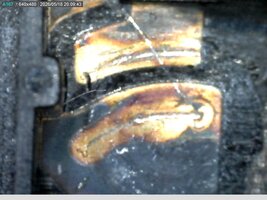
And the inside of this switch before cleaning, click to enlarge:

iP4000 switch.jpg

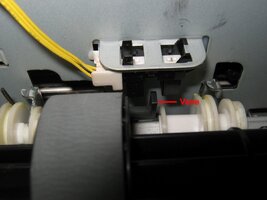
And here is the paper present optical sensor, the vane blocks the light path when no paper is present, click to enlarge:

iP4000 paper sensor.jpg

With the CD door switch cleaned the printer works again, but but is in need of a printhead cleaning as magenta and light magenta nozzles are almost totally clogged. But that is another story.

You can use a modern digital multimeter with a continuity test function to check switches in circuit. My DMM has an open circuit voltage of 3 V and a short circuit current of 3 mA when used as a continuity tester. Never use an old analog meter with an electromechanical buzzer for continuity test in modern electronics. The buzzer can create some nasty high voltage spikes that can kill semiconductors.

I hope this helps localizing a defective switch or sensor in the Pro 100.
 
Last edited:

annawong

Newbie to Printing
Joined
May 13, 2026
Messages
3
Reaction score
1
Points
3
Printer Model
Canon Pixma Pro 100
I found the error in the iP4000. It was the CD door switch that was dirty and needed cleaning. The front door switch was OK and the paper present in the printer optical sensor was also OK.

Here is the CD door switch. click to enlarge:

View attachment 18590


And the inside of this switch before cleaning, click to enlarge:

View attachment 18591

And here is the paper present optical sensor, the vane blocks the light path when no paper is present, click to enlarge:

View attachment 18593

With the CD door switch cleaned the printer works again, but but is in need of a printhead cleaning as magenta and light magenta nozzles are almost totally clogged. But that is another story.

You can use a modern digital multimeter with a continuity test function to check switches in circuit. My DMM has an open circuit voltage of 3 V and a short circuit current of 3 mA when used as a continuity tester. Never use an old analog meter with an electromechanical buzzer for continuity test in modern electronics. The buzzer can create some nasty high voltage spikes that can kill semiconductors.

I hope this helps localizing a defective switch or sensor in the Pro 100.
Thanks for your suggestion
 

donaldolsen

Printing Apprentice
Joined
May 4, 2026
Messages
10
Reaction score
1
Points
15
Location
United States
Printer Model
Canon i560
Hello,
My Pro-100 is not printing. The yellow light flashes three times. I’ve checked every possible cause for this error but found nothing wrong—no paper jams or other issues. When I send a file to print, the printer feeds about an inch of paper, then stops and the yellow light flashes three times.

This is a new issue; the printer worked perfectly until now. I’ve tried turning it off and on several times. I’ve never experienced a print with a missing portion of paper before. After restarting, the yellow light is not blinking, but it starts blinking again when I try to print, and it won’t stop. At one point, it successfully printed a 4x6 photo, but nothing has printed correctly since.

Any assistance would be greatly appreciated.
When the Pro-100 is flashing yellow 3 times, it most likely indicate either a paper feeding or ink absorber problem. Below are some things you can try:
  • Perform a hard reset on the printer by unplugging the powercord while it is turned on, waited for 5 min, and plugged back in.
  • Try doing a nozzle check and cleaning through the printer utility to eliminate clog as a reason.
  • The ink absorber may be full. Canon provides free "Absorber Reset Utility" that can reset ink absorber error.
If the absorber reset does not work, you may have a service reset which requires walking through by the support.
 
Top