Canon does not recognize cartridge?

alexandereci

Printing Ninja
Joined
Feb 12, 2006
Messages
231
Reaction score
1
Points
99
I'm using a Canon Pixma IP1600 with a CL-41 color cart. This is my third cart, and the color started to streak and fade. I tried cleaning it by cleaning out the ink and replacing it with alcohol and letting it sit in the printer. I did a couple of "deep cleans" to get the ink into the printhead itself, a few printruns, then decided to "refill" the alcohol.

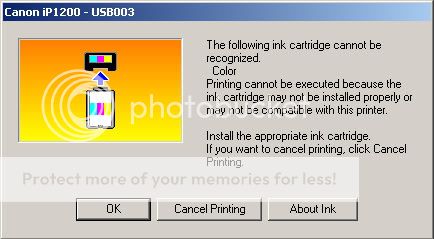
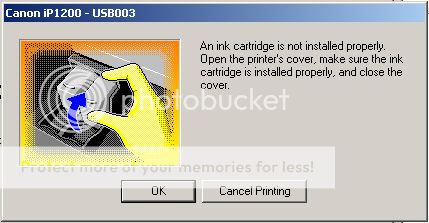
When putting the cart back into the printer, the printer says I have installed a wrong cart or that the printer does not "recognize" the cart... sometimes it is telling me I installed the cart wrong and should reinstall it. No matter what I do, the printer won't recognize this cart, which it recognized just a few moments earlier.

Any help? Has anyone experienced this?
 

alexandereci

Printing Ninja
Joined
Feb 12, 2006
Messages
231
Reaction score
1
Points
99
Here's the two messages the printer gives me:

#1
Cartnotinstalledproperly.jpg


#2
Cartnotinstalledproperly2.jpg
 

tigerwan

Printer Guru
Joined
Feb 3, 2007
Messages
189
Reaction score
4
Points
126
Location
B.C.
Have you tried cleaning the contacts on the cartridge, some alcohol if it's not 100% pure will leave a film on the electrical contacts, which cause errors. If after cleaning the cartridge is still not accepted, then i would say, it is no good, some kind of damage has been caused by your handling of the cartridge.
 

headphonesman

Printer Guru
Joined
Mar 18, 2006
Messages
250
Reaction score
2
Points
109
To the above, I would add the following:-

I have refilled my C41 for use in the MP150 many times and not experienced these messages. I always treat the contacts on the cart with respect, wiping over with a dry tissue, after re-fill.

However, the way they clip into the head mechanism (on the MP150 ) prompted me to peer into the machine to see how the cart contacts to the machine. The method is the standard Canon way of small spring pins, these can get damaged or over bent back and fail to make proper contact.

The test for this would be to offer a known working (new?) cart to the machine, if this gives the same message then defective machine pins would be the probable cause. Try to bend them back to their proper place.

If the new cart works then the original C41 contacts have been compromised and the cart can be disposed of.

hope this helps
 

alexandereci

Printing Ninja
Joined
Feb 12, 2006
Messages
231
Reaction score
1
Points
99
Thanks for the help. Seems like the old contacts on the cart have been "compromised," although I don't know how this happened. Got hold of some "used" carts, and the printer recognized them properly --- including the fact that they were "used!" Lol... so long as the printer knows the cart is installed, the "ink level" issue isn't an issue.
 

ljstart-canon

Newbie to Printing
Joined
Dec 30, 2025
Messages
1
Reaction score
0
Points
6
Location
United States
Printer Model
Canon PIXMA MG3620
In the instance that your Canon printer by chance does not accept the ink cartridge, it is more often than not a matter of installation, compatibility or contact errors. So, first thing, turn off the printer and open its cartridge compartment. Take out the cartridge and check if the protective tape or plastic seal has been removed or is still on. If it is still on, then take it off completely and put the cartridge back in properly until you hear a click.

The next thing you want to do is to ensure that you have a real Canon cartridge that is compatible with your printer model. Using non-genuine or refilled cartridges can lead to recognition problems. You may also clean the gold or copper contacts of the cartridge very gently with a lint-free cloth to get rid of dust or ink residue.

Take the printer back after the cartridges have been reinstalled. One more option is to update or reinstall printer drivers from ij.canon.start to troubleshoot the software-related issues. If the issue persists, then try to replace the cartridge with a new one. The proper handling and the correct installation usually help in quickly resolving cartridge recognition problems.
 
Top