Zandhoeg
Newbie to Printing
- Joined
- Nov 29, 2024
- Messages
- 9
- Reaction score
- 1
- Points
- 8
- Printer Model
- Brother dcp-j4110dw
Hope I post this on the right place, Brother related but maybe also more related to printing photography etc.
Brand new to the forum and tried searching a bit but found a lot of technical things I am not sure I am ready for just yet, at least not without someone holding my hand.
Got my monitor(s) calibrated the other day with a Spyder 4 I got to borrow from my father. Used DisplayCal (older version, not the re-born from GitHub)
It was not that much off, but it is better now. Before that I edited the images and did a test print and re-edited to get the color that was intended (correct on the monitor).
But I can't keep doing this. So this printer do not have any profiles except the standard "cover all" type, and two for Brother paper I do not thing I even can get my hands on atm.
So options as I see it is;
Keep editing the images with trial and error.
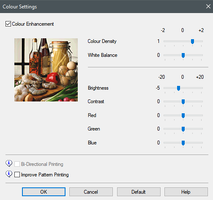
Use the "Color Enhancement" from the printer settings and with trial and error try to match screen to print. Unsure if this option is more a "make this color vibrant" than "add more of this".
Make a custom printer profile - issue is I got not tool to measure the colors so it have to be by eye.
Change the monitor to correspond w the colors the printer print (not a fan of as the monitor is used for other things as well).
From what I can see by eye under daylight bulbs compared to professionally printed picture (colors match screen more or less) of the one I try to print myself is that the green is dull (almost matte) brighter green (de-saturated maybe), the red as well. Blue is harder to see. And an over all, everything looks like a step or two de-saturated or faded in a strange way.
Ideas? Options?
Thanks in advance
/ Z
Brand new to the forum and tried searching a bit but found a lot of technical things I am not sure I am ready for just yet, at least not without someone holding my hand.
Got my monitor(s) calibrated the other day with a Spyder 4 I got to borrow from my father. Used DisplayCal (older version, not the re-born from GitHub)
It was not that much off, but it is better now. Before that I edited the images and did a test print and re-edited to get the color that was intended (correct on the monitor).
But I can't keep doing this. So this printer do not have any profiles except the standard "cover all" type, and two for Brother paper I do not thing I even can get my hands on atm.
So options as I see it is;
Keep editing the images with trial and error.
Use the "Color Enhancement" from the printer settings and with trial and error try to match screen to print. Unsure if this option is more a "make this color vibrant" than "add more of this".
Make a custom printer profile - issue is I got not tool to measure the colors so it have to be by eye.
Change the monitor to correspond w the colors the printer print (not a fan of as the monitor is used for other things as well).
From what I can see by eye under daylight bulbs compared to professionally printed picture (colors match screen more or less) of the one I try to print myself is that the green is dull (almost matte) brighter green (de-saturated maybe), the red as well. Blue is harder to see. And an over all, everything looks like a step or two de-saturated or faded in a strange way.
Ideas? Options?
Thanks in advance
/ Z