Tin Ho said:
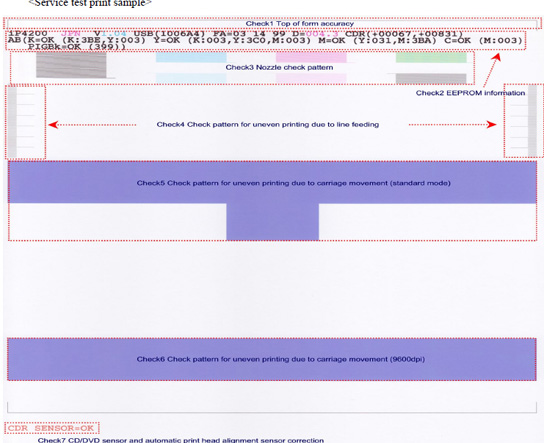
Your original picture was much larger and only the dye black patch showed a problem. If it wa a scanner aliasing problem it would have shown the problem on all dye color patches too. You are the owner of the printer. You can look at the nozzle check yourself and see if the dye black patch is in perfect shape. Compare to what you posted. You can tell if the posted image is or is not the same as your original. It looked to me that it was not perfect. It looked like 8 step cases. It looked more like a print head problem than a scanner aliasing pattern to me.
Tin Ho, you are very knowledgeable. I hope to increase my knowledge. Since you said it's not a scanner aliasing problem, probably you can help explain why after he adjusted his scanner setting to improve on the resolution, his dye black nozzle check images at post #14 & #16, no longer display the color patch or 'Bk Swatch' which he called at post #9?
If you do ever read post carefully, you would have realized the owner of the printer already described at post #7, his 1st scanned nozzle checks printout as look good and clear to him. However his scanned nozzle check image, the dye black displayed this 'BK swatch' or color patch.
mrelmo said:
printer is in standard print mode, here is copy of the nozzle check, it looks good these checks have always been a little skewed on top which i didn't know what to make of but the nozzles look clear
Obviously, there were problem with his printhead/clog/ other causes etc, for which he doesn't know how to interpret from his nozzles check, otherwise he wouldn't have report of his problem.
Most people would have opted for plain paper setting when printing a manual. For ip4200, that would have use the PGI-5Bk cart instead the CLI-8BK cart. Of course, there will always be some people who probably for whatever reason may select other photo setting setting to print a manual. But my guess when I first read his post would have been, he had selected plain paper as the media type when he printed his manual. So the dye black wouldn't be the actual cause of his problem. But unfortunately his nozzle check printout is really not clear for Grandad35. And he doesn't explicitly say whether he had opted for plain paper setting or photo setting to print his manual where he first reported of his problem.
Even if his dye black nozzles check were clog or had other printhead problem, they would had appeared as streaky, white horizontal line, missing line, lighter color, missing color, 1/2 banding color, irregular color etc... but appearing in the form of rainbow patch colors??????
I really like to hear your explanation why his dye black nozzle check doesn't appear physcially to him having color patch/'BK swatch'(rainbow patch color) when he was holding the nozzle printout ( refer to post #7 ) but only appeared when scanned and posted since afterall you said it was not scanner aliasing issue. I hope I can gain some understanding and learn from your knowledge.