

Tony4597
Printer Guru
- Joined
- Jan 20, 2021
- Messages
- 141
- Reaction score
- 84
- Points
- 115
- Location
- Cheshire, UK
- Printer Model
- Epson Surecolor SC P800
Over the holidays I have been playing with Bambu Studio i.e. exploring the menus in an effort to get a better understanding of the options. A friend mentioned a menu item that I had not come across before which opens up some of the things that I liked about the Orca slicer that appeared to have been taken away with Bambu implementation, i.e. the calibration options. TBH I have no idea how long this option has been in Bambu Studio!
Of course I could be the last one on the planet to hear about this but FWIW I thought that it may be of use to others.
Explained in the screenshots
Of course I could be the last one on the planet to hear about this but FWIW I thought that it may be of use to others.
Explained in the screenshots
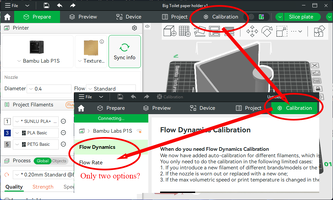
- When you first open Bambu Studio in the menu section you are presented with a Calibration tab, clicking on this only gives you two options. Disappointing compared to Orca's offerings
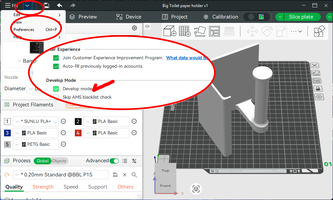
- However, there is a hidden menu item. Well an option that is not enabled by default. Click on the down arrow next to the File option in the top menu and select Preferences>scroll to the bottom of the dialogue box to Develop Mode and tick the Develop mode box.
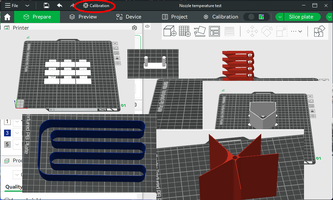
- Now you should have a new Calibration menu at the top menu line which opens up some of the missing calibration options
Attachments
Last edited: