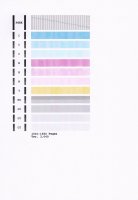
Strange nozzle check on mg6250

wilko

Print Addict
Joined
Feb 20, 2008
Messages
241
Reaction score
80
Points
173
Location
leeds, UK
Printer Model
Canon Pixma
Nozzle check shows photo black as 2 colours top half is normal black whilst bttom half is grey.

Tried head cleans and cartridge change which make no difference.

Consequently blacks in photos, print as black and grey stripes.

Am I looking at a dead print head?
 
Here is nozzle check
 

Attachments

  • IMG.jpg
    IMG.jpg
    60.7 KB · Views: 492
Appears to be a print head problem. A service test print would be definitive, but I don't know how to force one from your printer.
 
Aside from the BK all the other colors are looking blocky.
You could try a head cleaning outside of the printer, but I suspect (the beginning of) an electrical damage, which can not be cleaned. Therefore you have to be aware of the risk that a damaged logic board of the head could damage the logic board of the printer...
 
I reckon you have no choice in the matter, a new head is needed, that of course is if you want to keep this printer rather than buying a new.

Canon may give away printers but they sure know how to charge for their print heads.. :(
 
IF you go for a new printhead or a new printer, assure you select "silent mode" or "night mode" in the driver. This slows printing (to reduce noise) and also reduces thermal duty on the print head. As does increasing "drying time" in the driver for multi-sheet documents.
 
Back
Top