Something is wrong with your colour balance. The squares should be black or neutral grey. I think there is a problem with magenta. I found the test image on the web and printed it on plain paper using a Canon iP4300. Here is a scan of the print, click to enlarge. I had a problem with the width of the testprint, maybe it is not A4?
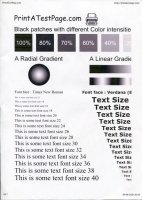
Notice that only the 100 % square and the text is neutral black, the other squares have a magenta cast, specially noticeable in the 40 % square. This magenta cast is typical of many Canon printers. So this shows that not only pigment black is used but also dye CMY colours. I have modified a webcam to work in near infrared. In near infrared pigment ink is black and dye ink is transparent. Here is a webcam shot, click to enlarge:

Notice missing 60, 40 and 20% squares, only dye colours are used printing them, no pigment black
Here is a 200 X magnification from the 70% square, notice both pigment black and dye colours are used, click to enlarge:

And here is a magnification from the 20% square notice no pigment black is used, only dye colours, click to enlarge:

So it is seen that colour balance is important even when printing B&W images with grey tones. A colout test image with a greyscale might be helpful in adjusting the colours,
maybe this test image and procedure will be useful?




