Canon pixma pro100 printing issues

Yachtcruising

Newbie to Printing
Joined
May 15, 2026
Messages
5
Reaction score
1
Points
3
Printer Model
Canon Pixma Pro100
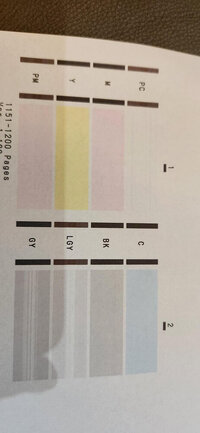
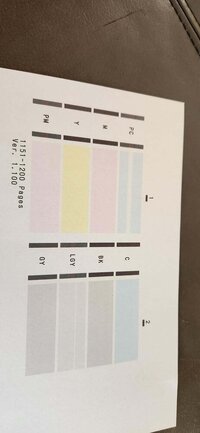
I have had this printer a while. If my test pattern page comes out bad, I know to do a deep clean and if that doesnt work I manually clean the printhead - and that's always solved the problem. However recently, I had a test pattern page first attached page, (you can see the PC doesnot show at all and the LGY has lines across it) and after I did a manual clean it did not get any better. I was about to dump the printer when I decided to do another test print (after it sat for three weeks) and got the second page result. The PC is so much better and the LGY is almost totally good too. I did another manual clean, but it has got better than that 2nd page.

Any other suggestions?
 

Attachments

  • 20260426_081425.jpg
    20260426_081425.jpg
    53.5 KB · Views: 17
  • Printhead 2.jpg
    Printhead 2.jpg
    46.8 KB · Views: 15

donaldolsen

Newbie to Printing
Joined
May 4, 2026
Messages
6
Reaction score
0
Points
8
Location
United States
Printer Model
Canon i560
Because it recovered once left, it does sound more like a partial blocked nozzle on air-lock to me than an utterly dead head! I would try a few normal cleans (don't do too many deep cleans in a row) and print some color pages to get ink flowing, then call it a dead print head.
 

The Hat

Printer VIP
Platinum Printer Member
Joined
Jan 18, 2010
Messages
16,199
Reaction score
9,140
Points
453
Location
Residing in Wicklow Ireland
Printer Model
Now have 3 Ender-3 V3 Plus SE/
Any other suggestions?
There is a very simple fix to your print problem, you need to get a new print head, because no amount of cleaning will solve an electrical problem, and despite the so called expert above, never do more than one deep head clean at a time..:old

You have choice now, buy a new print head from an Authorised Canon dealer or call it a day and dump the printer..
 

Yachtcruising

Newbie to Printing
Joined
May 15, 2026
Messages
5
Reaction score
1
Points
3
Printer Model
Canon Pixma Pro100
Because it recovered once left, it does sound more like a partial blocked nozzle on air-lock to me than an utterly dead head! I would try a few normal cleans (don't do too many deep cleans in a row) and print some color pages to get ink flowing, then call it a dead print head.
Thanks I will try that
 

Yachtcruising

Newbie to Printing
Joined
May 15, 2026
Messages
5
Reaction score
1
Points
3
Printer Model
Canon Pixma Pro100
There is a very simple fix to your print problem, you need to get a new print head, because no amount of cleaning will solve an electrical problem, and despite the so called expert above, never do more than one deep head clean at a time..:old

You have choice now, buy a new print head from an Authorised Canon dealer or call it a day and dump the printer..
How can I tell whether the problem is jist down to the print head and not an electrical problem within printer itself? I wouldnt want to buy an expensive print head and then still have a problem.
 

Yachtcruising

Newbie to Printing
Joined
May 15, 2026
Messages
5
Reaction score
1
Points
3
Printer Model
Canon Pixma Pro100
How can I tell whether the problem is jist down to the print head and not an electrical problem within printer itself? I wouldnt want to buy an expensive print head and then still have a problem.
 

Yachtcruising

Newbie to Printing
Joined
May 15, 2026
Messages
5
Reaction score
1
Points
3
Printer Model
Canon Pixma Pro100
How can I tell whether the problem is jist down to the print head and not an electrical problem within printer itself? I wouldnt want to buy an expensive print head and then still have a problem.
 

The Hat

Printer VIP
Platinum Printer Member
Joined
Jan 18, 2010
Messages
16,199
Reaction score
9,140
Points
453
Location
Residing in Wicklow Ireland
Printer Model
Now have 3 Ender-3 V3 Plus SE/
How can I tell whether the problem is jist down to the print head and not an electrical problem within printer itself?
If your printer had any other issues, it just wouldn’t print, your electrical problem is solely in the print head and that is evident in your last nozzle check, a new print head will solve all you print problems 100%..
 
Top