Epson p700 print head alignment problem

Lynnea1941

Print Lurker
Joined
Nov 29, 2025
Messages
5
Reaction score
0
Points
1
Printer Model
Epson P700
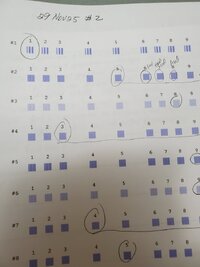
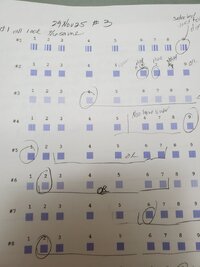
I have done several print head alignment sheets. The first row just never changes. It doesn't matter what number I use for the "best" square, the result is always the same and all the squares look alight.

I am in email conversation with Tech Support, and I will be doing my third round doing the print alignment. I do see changes in several rows, just not the first row.

Any suggestions?

Thanks.
 

Lynnea1941

Print Lurker
Joined
Nov 29, 2025
Messages
5
Reaction score
0
Points
1
Printer Model
Epson P700
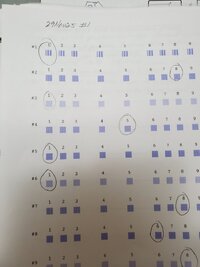
Here are the three alignments I have done today. The first row doesn't change. The other rows do change.
Lynnea
 

Attachments

  • 20251129_210930.jpg
    20251129_210930.jpg
    57.5 KB · Views: 20
  • 20251129_210957.jpg
    20251129_210957.jpg
    62 KB · Views: 20
  • 20251129_211031.jpg
    20251129_211031.jpg
    69.8 KB · Views: 20

Lynnea1941

Print Lurker
Joined
Nov 29, 2025
Messages
5
Reaction score
0
Points
1
Printer Model
Epson P700
I have done 15 sheets of print head alignment today, and I do see improvement. But, just no change with the first row. All the numbers are now crisp. I plan to do more sheets tomorrow.

Any idea about the problem with the first row? I am checking the squares with an magnifying glass, and I see no change at all.

Thanks,
Lynnea
 

thebestcpu

Fan of Printing
Joined
Dec 8, 2024
Messages
184
Reaction score
113
Points
70
Printer Model
Epson SC P900
HI @Lynnea1941
I have an Epson P900, and the pattern they use is unfortunately not the same as what you show for the P700. A bit odd since the head and mechanism are the same. I don't know if that is because we have different firmware versions or if they are just different between the P700 and the P900. I show my head alignment pattern in the attached image.

I did find one reference online indicating that, for your particular pattern, the first line does not change, and that is normal. If you were in touch with Epson support, I don't know why that wouldn't already be known.

I would like to know if you have the latest firmware on your P700. If not, you could consider upgrading unless you have a reason not to.

Also, I would suggest that you do a nozzle check to make sure there is nothing funny going on with the nozzles, causing some issue with the alignment pattern (not likely, yet worth checking)

Then I would like to know if you are seeing any problems with your actual prints. If not, we may be overthinking this problem, and it might be time to just move on (or have a better Epson Tech, as this should be a simple issue for any good Epson Tech IMHO)

Just some quick thoughts
John Wheeler

P900 Head Alignment.jpeg
 

Lynnea1941

Print Lurker
Joined
Nov 29, 2025
Messages
5
Reaction score
0
Points
1
Printer Model
Epson P700
Hi,
Thanks for your help.
I do have the latest firmware. I will check with Epson support re the first line. I will query them about it.
Thanks for that tip.

I did have a print problem before I started the print head alignment. I did a nozzle check. I did a cleaning. Both were good..

My plan is to do more alignment papers, and then try a print.

Thanks for your reply.
Lynnea
 

Lynnea1941

Print Lurker
Joined
Nov 29, 2025
Messages
5
Reaction score
0
Points
1
Printer Model
Epson P700
Could you please include a link to the reference in regard to the first line?

Also, is it the goal to have all the "best" square in a specific column. I notice that you have a large number in column five.

Thanks,
Lynnea
 

Ink stained Fingers

Printer VIP
Platinum Printer Member
Joined
Dec 27, 2014
Messages
6,325
Reaction score
7,536
Points
373
Location
Germany
Printer Model
L805, WF2010, ET8550, T3100X
Also, is it the goal to have all the "best" square in a specific column. I notice that you have a large number in column five.
No, there is no verification print after you enter the correction values and finish/close the alignment job.
When you start the alignment job again it starts from the uncorrected status. It just may display your last entries. So don't go into an endless iterative cycle.
 
Top