t-flo
Printing Apprentice
- Joined
- Mar 12, 2026
- Messages
- 5
- Reaction score
- 0
- Points
- 11
- Printer Model
- Canon Pro-100 and Canon Pro-10
Hi there!
I've owned my Pro-100 since 2016 when I bought it new from B&H. I've been using Precision Colors inks since then, in fact my cartridges are still the setup cartridges that came in the package with the machine that I drilled a decade ago. It was fairly reliable until I loaned it to a friend for a year—he didn't mistreat it, but I also don't think he printed much with it. Recently, it's been much less reliable in terms of nozzle clogs.
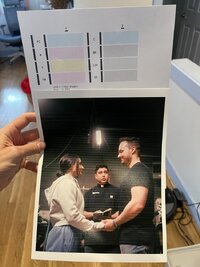
What's frustrating to me is that it will go from unclogged to clogged mid-print session. I can get a good nozzle check, print a page, and then print another page and I'll lose one of the colors mid-page. It's been group 2 (C, Bk, LGy, Gy) that's had the most persistent issues. Black always seems fine but the rest of the colors on that side tend to get clogged. Just today, I've used almost a full cartridge's worth of ink on cleaning/deep cleaning cycles. I can get a nearly clean nozzle check and then print for a page or two before the clog reappears. I've windex-soaked the printhead overnight twice, after that and a few cleaning cycles I can get some decent prints, but eventually the clog will return. It seems unlikely that it's simply drying out, because the clog will happen in the middle of a printing session, rather than after a week or month of sitting. See attached image for a clean nozzle check + a print that clogged midway through. I can attach images of pages and pages of lightly streaked nozzle checks if that's helpful.
Any more advice, or anything to try? The precision colors inks are a lot cheaper than OEM but I still hate wasting so much ink, not to mention the amount of time and paper I spend printing nozzle checks.
Incidentally, unrelated to this issue but since it's my first post I'll mention that I also have a (clogged) Pro-10 I got for free and haven't gotten around to fixing yet. I also have a Prusa Mini which strangely seems to be the most reliable printer in the house at the moment. I'm located in the USA.
I've owned my Pro-100 since 2016 when I bought it new from B&H. I've been using Precision Colors inks since then, in fact my cartridges are still the setup cartridges that came in the package with the machine that I drilled a decade ago. It was fairly reliable until I loaned it to a friend for a year—he didn't mistreat it, but I also don't think he printed much with it. Recently, it's been much less reliable in terms of nozzle clogs.
What's frustrating to me is that it will go from unclogged to clogged mid-print session. I can get a good nozzle check, print a page, and then print another page and I'll lose one of the colors mid-page. It's been group 2 (C, Bk, LGy, Gy) that's had the most persistent issues. Black always seems fine but the rest of the colors on that side tend to get clogged. Just today, I've used almost a full cartridge's worth of ink on cleaning/deep cleaning cycles. I can get a nearly clean nozzle check and then print for a page or two before the clog reappears. I've windex-soaked the printhead overnight twice, after that and a few cleaning cycles I can get some decent prints, but eventually the clog will return. It seems unlikely that it's simply drying out, because the clog will happen in the middle of a printing session, rather than after a week or month of sitting. See attached image for a clean nozzle check + a print that clogged midway through. I can attach images of pages and pages of lightly streaked nozzle checks if that's helpful.
Any more advice, or anything to try? The precision colors inks are a lot cheaper than OEM but I still hate wasting so much ink, not to mention the amount of time and paper I spend printing nozzle checks.
Incidentally, unrelated to this issue but since it's my first post I'll mention that I also have a (clogged) Pro-10 I got for free and haven't gotten around to fixing yet. I also have a Prusa Mini which strangely seems to be the most reliable printer in the house at the moment. I'm located in the USA.