Hi
@Charles218
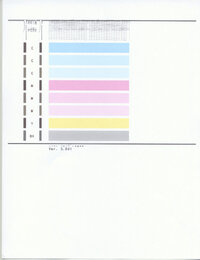
From your first image, the upper portion of the PGBK print head is not working correctly, while the lower portion is. I am not the expert yet I believe these are the nozzles for the pigment black ink. This is consistent with the smeared portion of the text being on the top portion of the print of text and not the bottom portion of the text in your second image.
Following is an image of the MX922 printhead I have pointed to the line of nozzles for the PGMK ink (to the best of my knowledge) and believe those are the culprit of the issue:
You want to ensure the PGMK ink cartridge is not low in ink. Change that first if it is.
Several options exist if you have followed the complete set of cleaning procedures.
- retry the cleaning procedures and see if improvement continues. Repeat until resolved or no improvement is seen
- remove the printhead for a soaking. Canon has not published an approach yet. Many follow this procedure, and there are YouTube videos on it. So, your mileage may vary. It's a judgment call to go the route not officially supported by Canon, yet it works for many if you want to save the expense of a printhead replacement or servicing of the printer. Here is a link on how to remove the printhead for inspection, washing, or replacement:
https://support.usa.canon.com/kb/s/article/ART143853?utm_source=chatgpt.com
The removal process is not difficult, yet more involved than just changing ink cartridges
- you could also remove the printhead and replace it as an option. The risk is that money is going down the drain if it is not a printhead issue. So that is a tradeoff versus having it sent for servicing.
The root cause is likely just a clogged printhead, yet it could also be a failure of the cleaning process.
OEM printheads are expensive, and there are aftermarket versions at a fraction of that cost.
In my earlier years, when I was scrimping on money and did not mind spending my time on debugging and repairing, I would go for the wash-it-myself approach or replace the printhead on my approach (even with a non-OEM printhead). Yet today, I want to get back to printing, so I lean towards spending more money for a solution.
Maybe there will be another forum member that has that specific printer model that can better advise
Hope this helps
John Wheeler